Making Math Learning Easier with Optimized Search and User Experience
Summerinternship UX Designer @House of Math
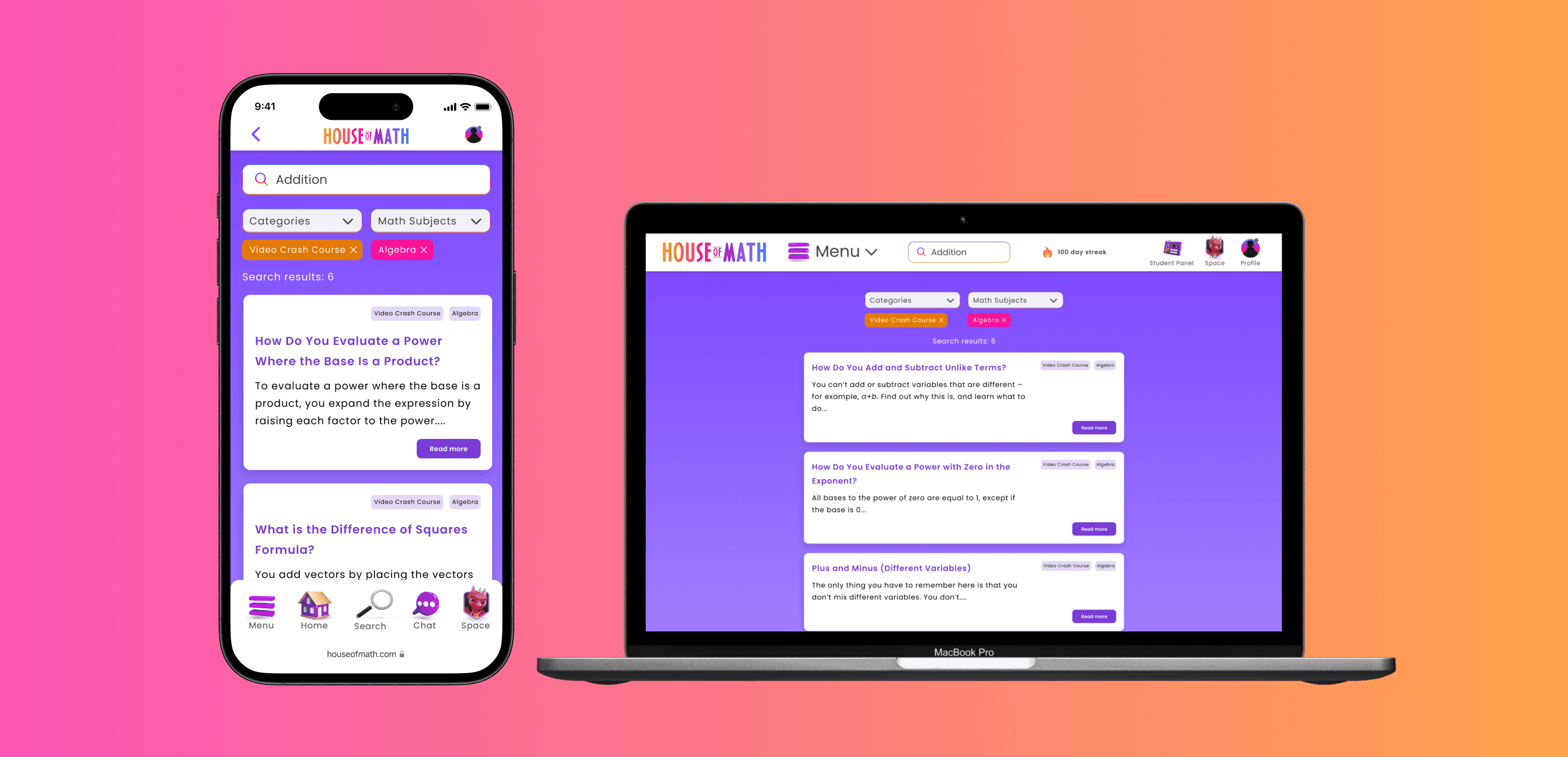
House of Math is dedicated to its vision: easy access to learning math. Using technology and gamification, along with engaged private tutors, they continuously strive to offer the best learning platform for math. My goal was to improve the user experience and accessibility in the search field.
Making Math Learning Easier with Optimized Search and User Experience
Making Math Learning Easier with Optimized Search and User Experience
Summerinternship UX Designer @House of Math
House of Math is dedicated to its vision: easy access to learning math. Using technology and gamification, along with engaged private tutors, they continuously strive to offer the best learning platform for math. My goal was to improve the user experience and accessibility in the search field.
Deliverable
Deliverable
Mobile Design
Web Design
UX/UI Design
UX Research
Mobile Design
Web Design
UX/UI Design
UX Research
Contribution
Contribution
User Research
GUI Design
Workshop
Usability Testing
Prototyping
Design process
User Research
GUI Design
Workshop
Usability Testing
Prototyping
Design process
Timeframe
2 Months
Team
2 UX/UI Designers
1 Product Owner
Timeframe
2 Months
Team
2 UX/UI Designers
1 Product Owner
Background
Interns Erik and Karolina Transform House of Math's Search Feature for Enhanced User Experience
The interns Erik and Karolina, under the mentorship of a senior UX designer, embarked on a comprehensive summer internship project aimed at enhancing various aspects of House of Math's user experience. One of their projects was to enhance the platform's search feature to streamline its functionality and accessibility.
The interns Erik and Karolina, under the mentorship of a senior UX designer, embarked on a comprehensive summer internship project aimed at enhancing various aspects of House of Math's user experience. One of their projects was to enhance the platform's search feature to streamline its functionality and accessibility.

Challenge
Revamping the Search Field to Address User Frustrations and Enhance Result Accuracy
Revamping the Search Field to Address User Frustrations and Enhance Result Accuracy

Project Goals
Streamline the Search Experience: Redesigning the Search Field for Clarity, Responsiveness, and Personalization
Streamline the Search Experience: Redesigning the Search Field for Clarity, Responsiveness, and Personalization
Business Goal
Business Goal
Business Goal
Optimize the search functionality to ensure users discover and utilize a wider range of available educational content.
Improve the user repair booking flow to reduce drop-off rates for Fikse and our partnered third-party repair experts.
User Goal
User Goal
User Goal
Enable users to easily and efficiently locate specific educational materials and resources.
Enable users to easily and efficiently locate specific educational materials and resources.
Efficiently order repairs through the Fikse platform and our third-party repair experts.
Design Principles
Design Principles
Design Principles
Based on the insights gained from the discovery phase, I set three design principles for the newly optimized search field.
🔠
🔠
🔠
Simplicity and Clarity
Clarify repair options
Simplify the search field by minimizing unnecessary elements and distractions.
Ensure repair options in the user flow are understandable and intitive.
✅
✅
✅
Responsive Feedback
Responsive Feedback
Clear feedback on the status of users' search queries and when results are ready.
Provide feature allowing users to communicate garment issues to repairers for clarity and alignment.
📐
📐
📐
Personalization and Flexibility:
Personalization and Flexibility:
Customizable search preferences and filters based on user goals.
Customizable search preferences and filters based on user goals.
Establish standardized repair pricing, clearly displaying details to reduce cost confusion among users.
🔠
Simplicity
and Clarity
Simplify the search field by minimizing unnecessary elements and distractions.
✅
Responsive Feedback
Clear feedback on the status of users' search queries and when results are ready.
📐
Personalization
and flexibility
Customizable search preferences and filters based on user goals.
Solution
Implemented a Streamlined Filter and Categorization System to Simplify Content Discovery for Users
Implemented a Streamlined Filter and Categorization System to Simplify Content Discovery for Users
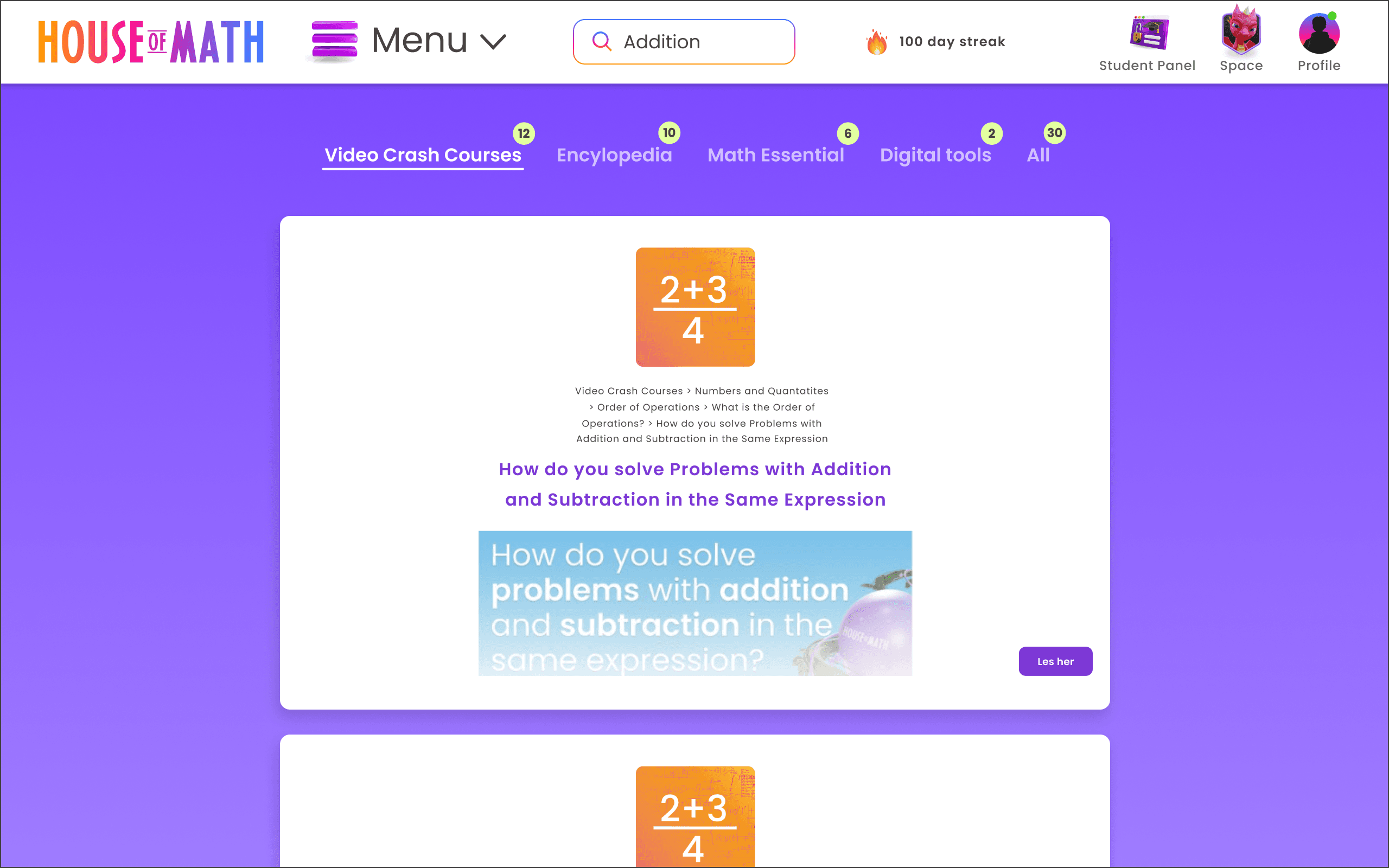
We've introduced a filter and categorization system to help users find content more easily, based on categories and specific math subjects.
We've introduced a filter and categorization system to help users find content more easily, based on categories and specific math subjects.
Before
After
Before

After
Changes made:
Filtering and categorization system for easily locating desired search content.
Redesigned Search Experience to Boost User Satisfaction with a Cleaner, More Intuitive Interface
Redesigned Search Experience to Boost User Satisfaction with a Cleaner, More Intuitive Interface
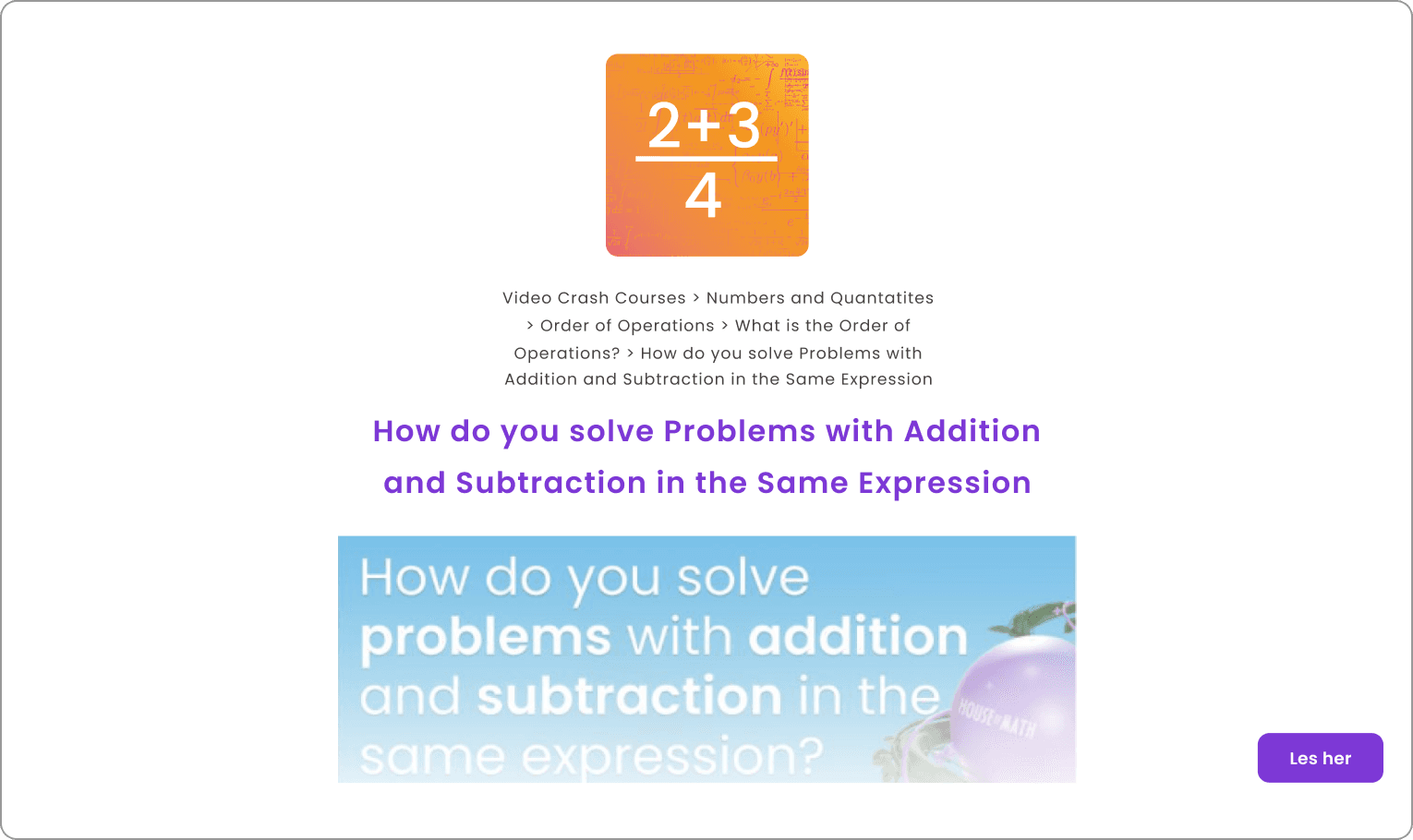
We simplified the search interface to boost user engagement and satisfaction by reducing visual elements and decluttering the user experience.
We simplified the search interface to boost user engagement and satisfaction by reducing visual elements and decluttering the user experience.
Before
After

Changes made:
Decrease the number of visual elements in the search interface to declutter
Enhancing Search with Immediate Visual Indicators of Processing and Results
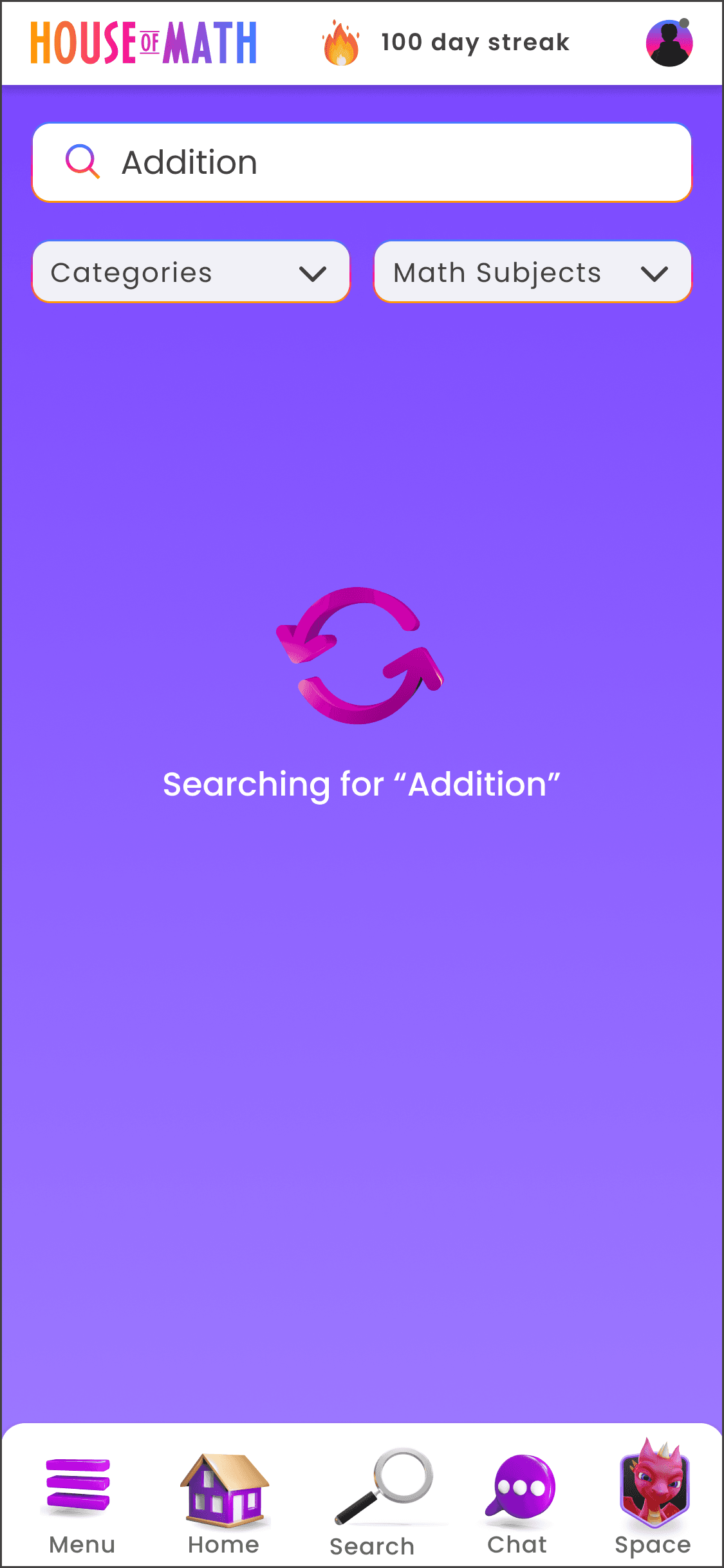
We have implemented visual cues that provide users with clear feedback and indications that their search query is being processed and when results are available. The previous design stayed the same and had no visual indication that the search was loading.
We have implemented visual cues that provide users with clear feedback and indications that their search query is being processed and when results are available. The previous design stayed the same and had no visual indication that the search was loading.
Before

After

Before

After
Changes made:
Visual feedback while waiting for a search to go through
Changes made:
Filtering and categorization system for easily locating desired search content.
Changes made:
Decrease the number of visual elements in the search interface to declutter
Changes made:
Visual feedback while waiting for a search to go through
Research
Exploring and Adapting Through Workshop Changes to Discover Key Insights in Search Field Usability
Exploring and Adapting Through Workshop Changes to Discover Key Insights in Search Field Usability
Our research goal was to understand user experiences, pinpoint pain points, and uncover unmet needs. We used Microsoft Clarity for quantitative analysis and conducted interviews and heuristic evaluations to gain insights into user perspectives.
Our research goal was to understand user experiences, pinpoint pain points, and uncover unmet needs. We used Microsoft Clarity for quantitative analysis and conducted interviews and heuristic evaluations to gain insights into user perspectives.
Findings from Product Owners
Findings from Product Owners
House of Math Product Owners (POs) noted that users face challenges in finding desired content due to search results prioritizing video material and presenting an overwhelming amount of content.
House of Math Product Owners (POs) noted that users face challenges in finding desired content due to search results prioritizing video material and presenting an overwhelming amount of content.
The search field prioritizes Video Crash Courses. As a consequence, other categories are deprioritized because they lack videos.
The search field prioritizes Video Crash Courses. As a consequence, other categories are deprioritized because they lack videos.
The search field prioritizes Video Crash Courses. As a consequence, other categories are deprioritized because they lack videos.
The search field is not optimal. Sometimes it is slow and unresponsive.
The search field is not optimal. Sometimes it is slow and unresponsive.
The search field is not optimal. Sometimes it is slow and unresponsive.
Users are confused by the category names, both in English and Norwegian.
Users are confused by the category names, both in English and Norwegian.
Users are confused by the category names, both in English and Norwegian.
It is difficult for users to find what they are looking for.
It is difficult for users to find what they are looking for.
It is difficult for users to find what they are looking for.
The search field is not optimized for long-tail searches. For example: "what is" searches.
The search field is not optimized for long-tail searches. For example: "what is" searches.
The search field is not optimized for long-tail searches. For example: "what is" searches.
The search field is not optimized for long-tailed search. For example: "what is" search.
The search field is not optimized for long-tailed search. For example: "what is" search.
Adapting to Last-Minute Changes
Last minute change:
From interview to workshop
Adapting to Last-Minute Changes
In sprint 2, a last-minute change shifted individual user interviews to a workshop format with all participants. The change led to an increased workload in sprint 2, requiring new workshops for each participant group and delaying data analysis.
Despite these challenges, we adapted, and sprint 2 was successful under the circumstances.
In sprint 2, a last-minute change shifted individual user interviews to a workshop format with all participants. The change led to an increased workload in sprint 2, requiring new workshops for each participant group and delaying data analysis.
Despite these challenges, we adapted, and sprint 2 was successful under the circumstances.
Triangulated Insights to Confirm
Findings
Triangulated Insights to Confirm
Findings
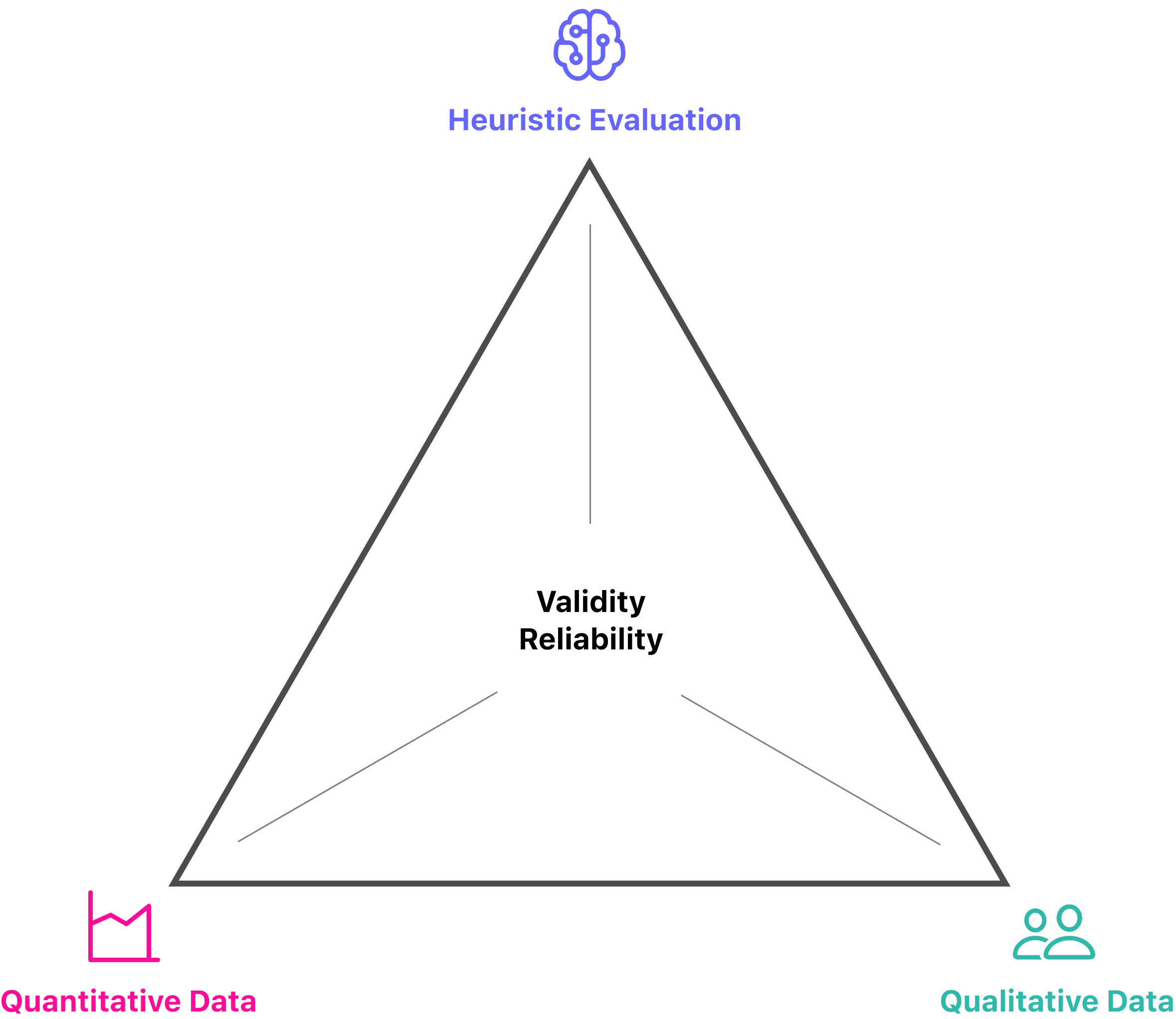
To validate our research findings and gain deeper insights into pain points, we used triangulation involving heuristic evaluation and quantitative and qualitative data sources.
To validate our research findings and gain deeper insights into pain points, we used triangulation involving heuristic evaluation and quantitative and qualitative data sources.
Key Findings from Heuristic Evaluation
Key Findings from Heuristic
Evaluation
Key Findings from Heuristic Evaluation
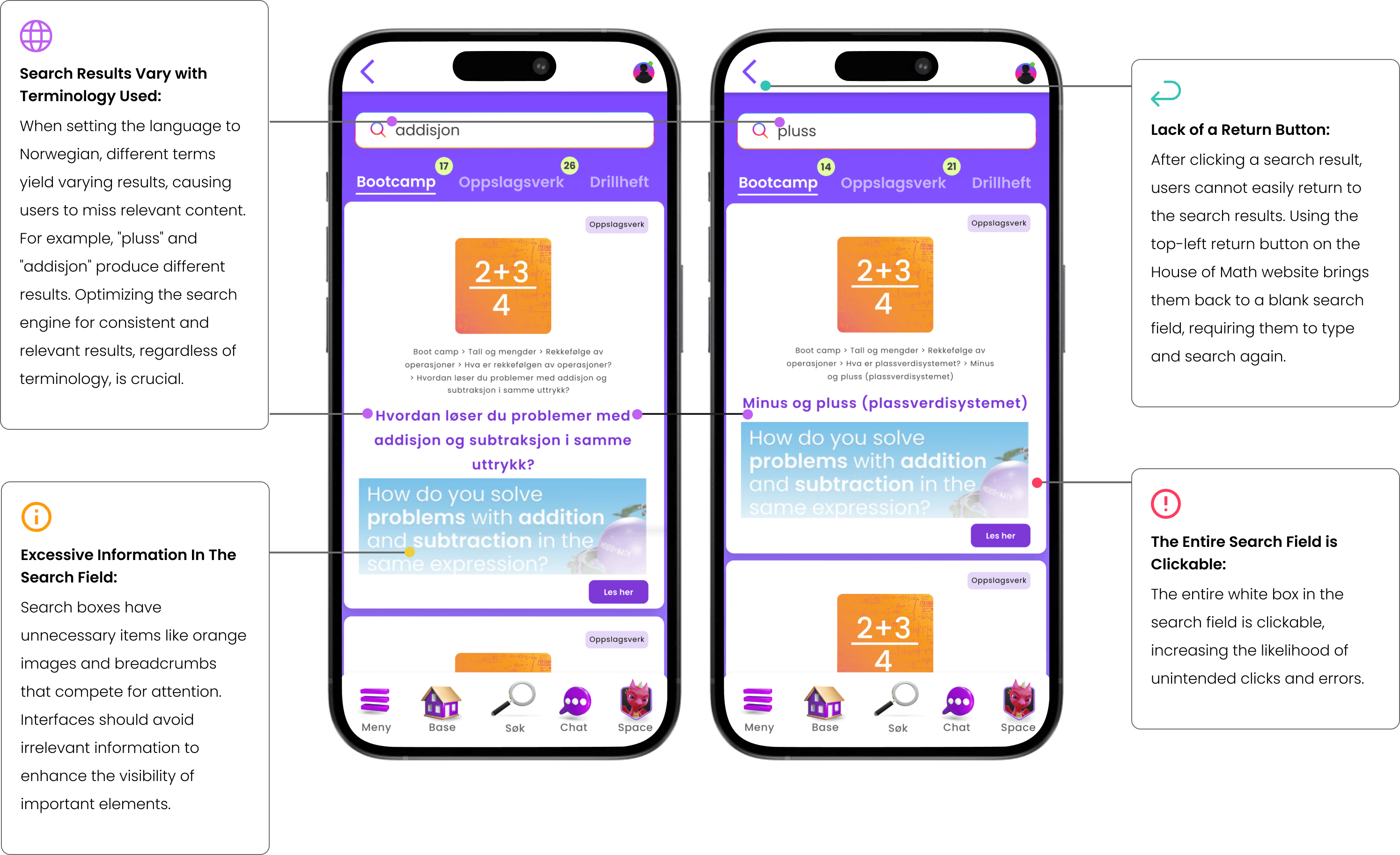
We identified some pain points in the search field based on the heuristic evaluation. Here are the results of our heuristic evaluation from the previous design:
We identified some pain points in the search field based on the heuristic evaluation. Here are the results of our heuristic evaluation from the previous design:
Quantitative Data Unveils User Patterns
Quantitative Data Unveils User
Patterns
Quantitative Data Unveils
User Patterns
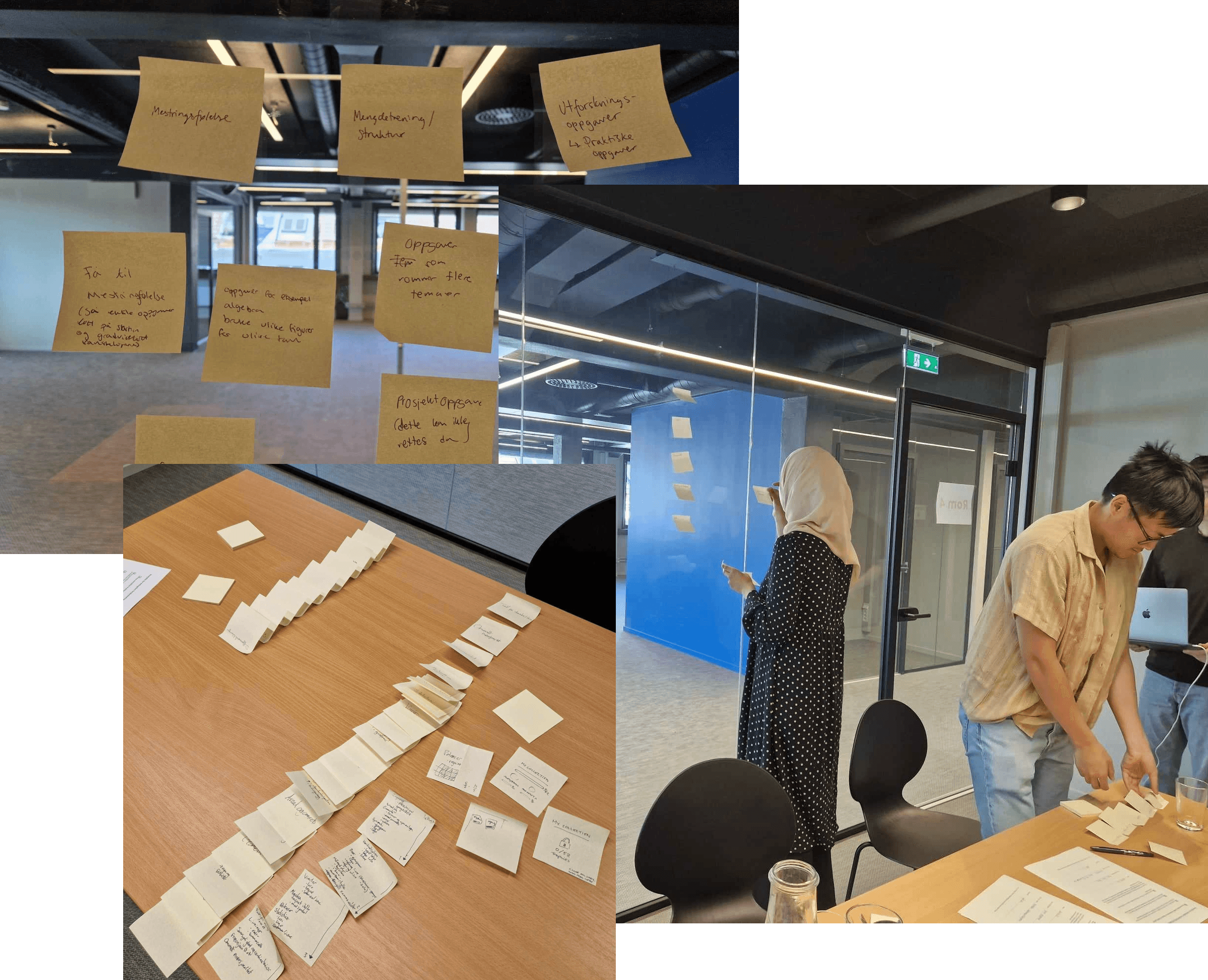
We used Microsoft Clarity to analyze user behavior and demographics. Our research focused on heatmaps, portal click patterns, and user recordings related to search, activities, and navigation.
Led Focus Groups with 23 Users
Despite Time Constraints
Led Focus Groups with 23 Users
Despite Time Constraints
Led Focus Groups with 23 Users
Despite Time Constraints
We held six workshops, with focus groups consisting of 16 private math teachers, 5 international math teachers, and 2 students. Here are the findings:
We held six workshops, with focus groups consisting of 16 private math teachers, 5 international math teachers, and 2 students. Here are the findings:
Pain points
Users feel overwhelmed by the large number of search results, making it difficult to find specific content.
Users feel overwhelmed by the large number of search results, making it difficult to find specific content.
Users feel overwhelmed by the large number of search results, making it difficult to find specific content.
Insufficient feedback during searches leaves users unsure if their search is being processed, with some experiencing long wait times.
Insufficient feedback during searches leaves users unsure if their search is being processed.
Insufficient feedback during searches leaves users unsure if their search is being processed, with some experiencing long wait times.
Users do not understand elements like the orange image, breadcrumbs, and the image at the bottom of the search field, leading to confusion.
Users do not understand elements like the orange image, breadcrumbs, and the image at the bottom of the search field, leading to confusion.
Users do not understand elements like the orange image, breadcrumbs, and the image at the bottom of the search field, leading to confusion.
Users accidentally click on the white search field while scrolling, causing unwanted actions.
Users accidentally click on the white search field while scrolling, causing unwanted actions.
Users accidentally click on the white search field while scrolling, causing unwanted actions.
Users struggle to return to the search field after clicking on a result, leading to confusion and extra effort.
Users struggle to return to the search field after clicking on a result, leading to confusion and extra effort.
Users struggle to return to the search field after clicking on a result, leading to confusion and extra effort.
Users are unclear about search terms, particularly between "ganging" and "multiplikasjon," resulting in different search results.
Users are unclear about search terms, particularly between "ganging" and "multiplikasjon," resulting in different search results.
Users are unclear about search terms, particularly between "ganging" and "multiplikasjon," resulting in different search results.
Observations
Users need clear feedback indicating that their search is being processed.
Users need clear feedback indicating that their search is being processed.
Users need clear feedback indicating that their search is being processed.
Users rely on the search field for specific content and prefer navigation when exploring or becoming familiar with the portal.
Users rely on the search field for specific content and prefer navigation when exploring or becoming familiar with the portal.
Users rely on the search field for specific content and prefer navigation when exploring or becoming familiar with the portal.
Users need clear terminology and easily accessible categories to find relevant content efficiently.
Users need clear terminology and easily accessible categories to find relevant content efficiently.
Users need clear terminology and easily accessible categories to find relevant content efficiently.
Ineffective communication options
Ineffect
ive communication options
Ineffective communication options
Ineffective communication options
Ineffective communication options
How Triangulation Enhanced Understanding of Search Problems
How Triangulation Enhanced
Understanding of Search Problems
How Triangulation Enhanced
Understanding of Search Problems
The triangulation approach provided a robust and multi-faceted view of the search functionality issues. By combining heuristic evaluation, quantitative analysis, and qualitative feedback, we were able to:
The triangulation approach provided a robust and multi-faceted view of the search functionality issues. By combining heuristic evaluation, quantitative analysis, and qualitative feedback, we were able to:
Confirm and Validate Findings
Confirm and Validate Findings
Cross-referencing insights from different sources confirmed the existence of key pain points and user needs, ensuring that our solutions would address the most critical issues.
Cross-referencing insights from different sources confirmed the existence of key pain points and user needs, ensuring that our solutions would address the most critical issues.
Prioritize Design Improvements
Prioritize Design Improvements
The combined data allowed us to prioritize design changes based on the severity and frequency of reported issues, leading to more effective and user-centered solutions.
The combined data allowed us to prioritize design changes based on the severity and frequency of reported issues, leading to more effective and user-centered solutions.
Enhance User-Centric Design
Enhance User-Centric Design
Integrating diverse data sources facilitated a deeper understanding of user behavior and preferences, enabling us to design a more intuitive and accessible search experience.
Integrating diverse data sources facilitated a deeper understanding of user behavior and preferences, enabling us to design a more intuitive and accessible search experience.
Sketching
Turning Key Findings into Actionable Sketches
Turning Key Findings into Actionable Sketches
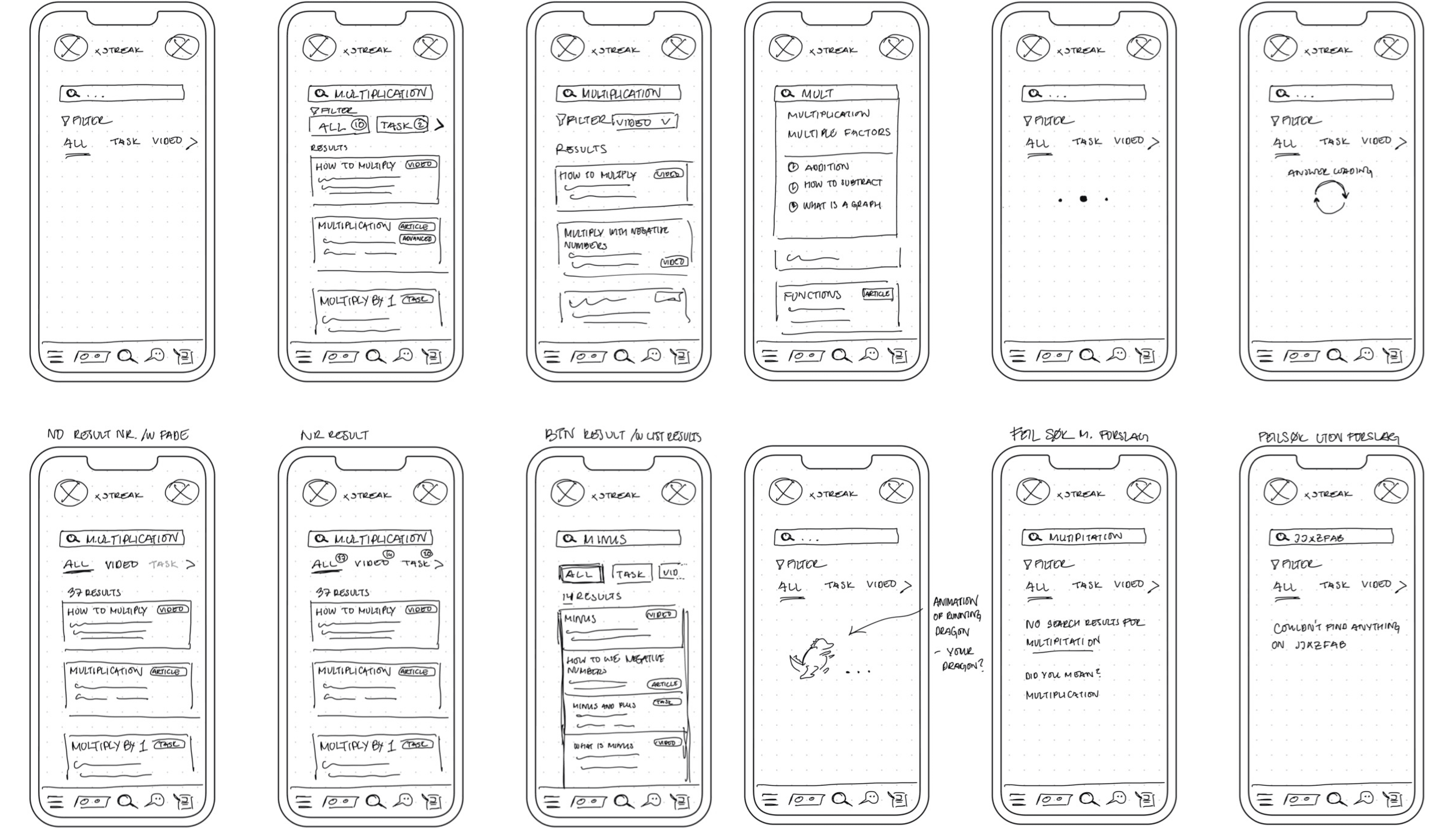
From the affinity diagram's pain points and ideas, we identified key findings. We then translated these ideas into sketches to lay the foundation for improvements, resolving these pain points and enhancing the search field's user experience.
From the affinity diagram's pain points and ideas, we identified key findings. We then translated these ideas into sketches to lay the foundation for improvements, resolving these pain points and enhancing the search field's user experience.
Prototyping
Creating an Intuitive User Experience by Iteratively Developing and Refining Prototypes
Creating an Intuitive User Experience by Iteratively Developing and Refining Prototypes
We brainstormed, developed prototypes from the top sketches, and created wireframes to visualize the user experience. This iterative process enabled ongoing adjustments to address user feedback and ensure a seamless and intuitive solution.
We brainstormed, developed prototypes from the top sketches, and created wireframes to visualize the user experience. This iterative process enabled ongoing adjustments to address user feedback and ensure a seamless and intuitive solution.

User testing
User testing
Gaining Critical Insights into Usability Through User Testing
Gaining Critical Insights into Usability Through User Testing
We conducted a small usability test with 5 users to evaluate the clarity, completion, and comprehension of the features we developed.
We conducted a small usability test with 5 users to evaluate the clarity, completion, and comprehension of the features we developed.

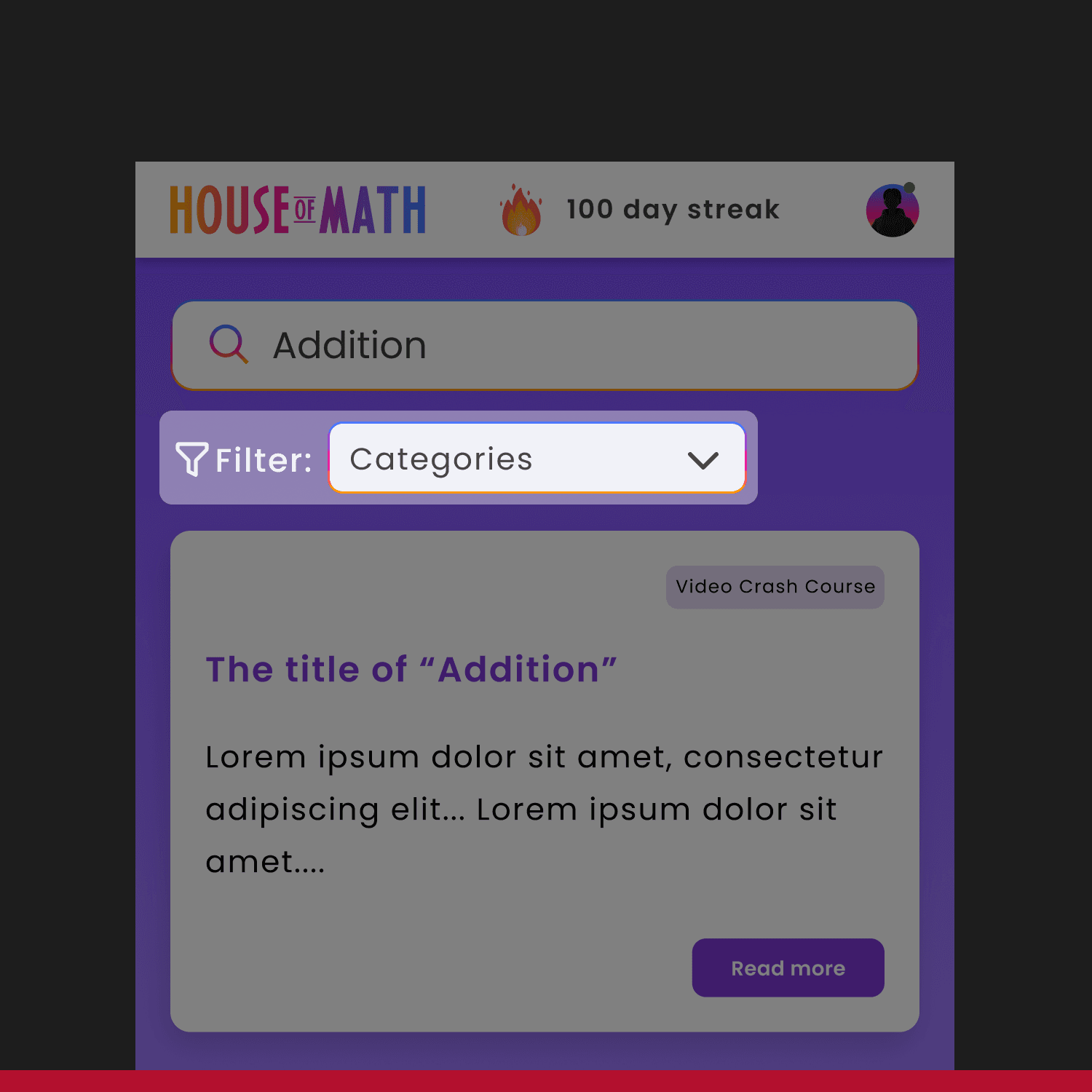
Before
Before
The "Categories" button was insufficient for users to filter and find their desired search results.
The "Categories" button was insufficient for users to filter and find their desired search results.
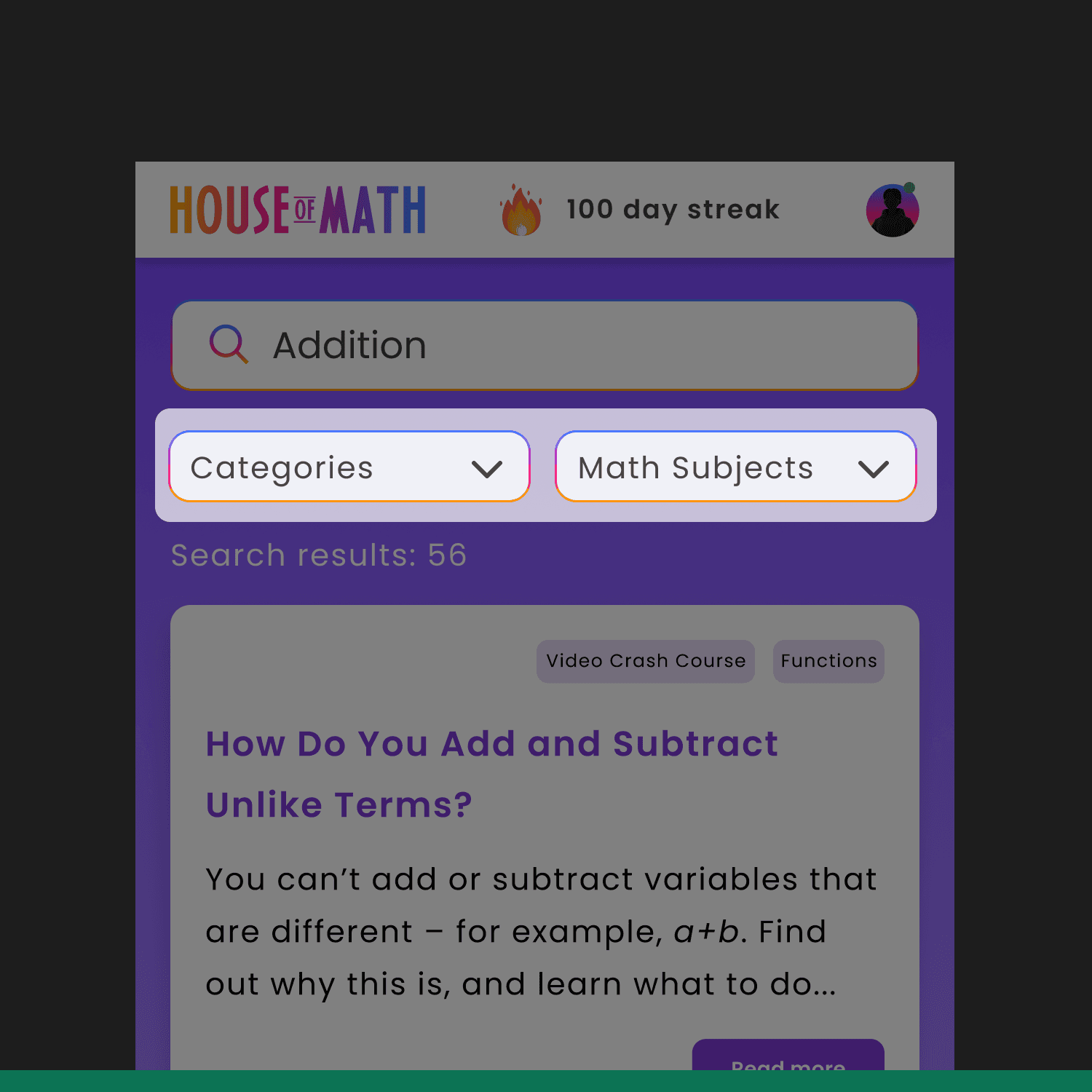
After
After
To address this, we added a "Math Subjects" filter to further assist users.
To address this, we added a "Math Subjects" filter to further assist users.
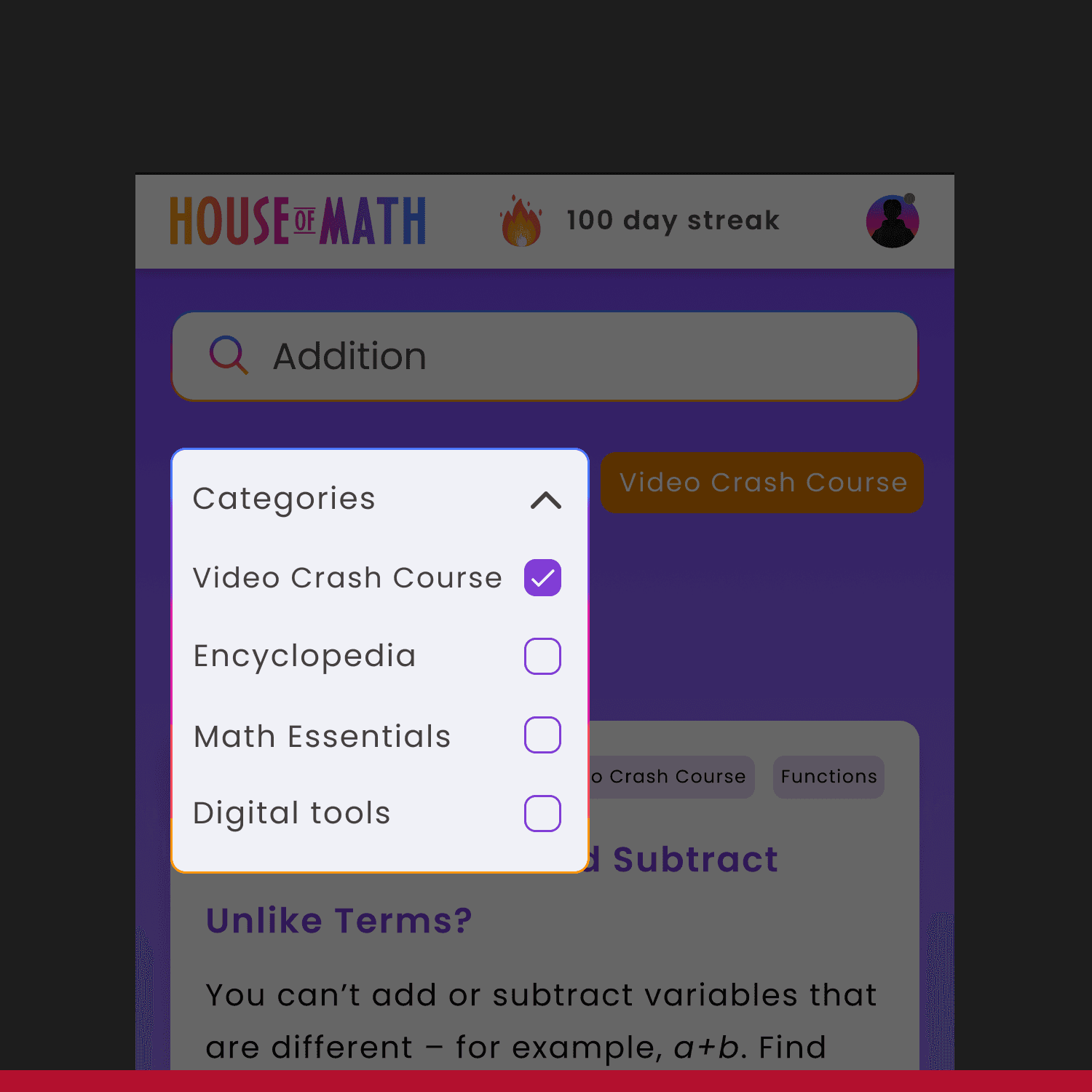
Before
Before
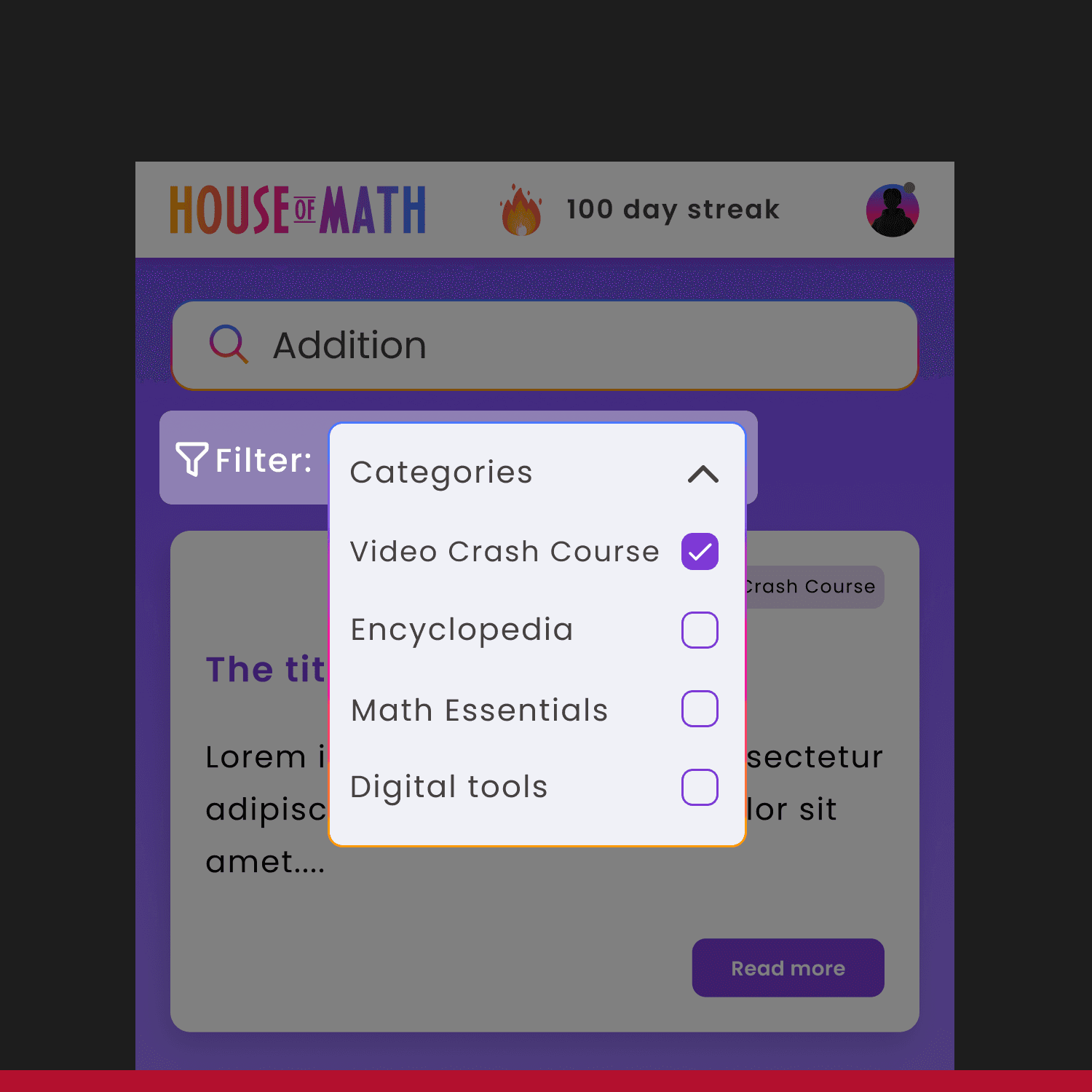
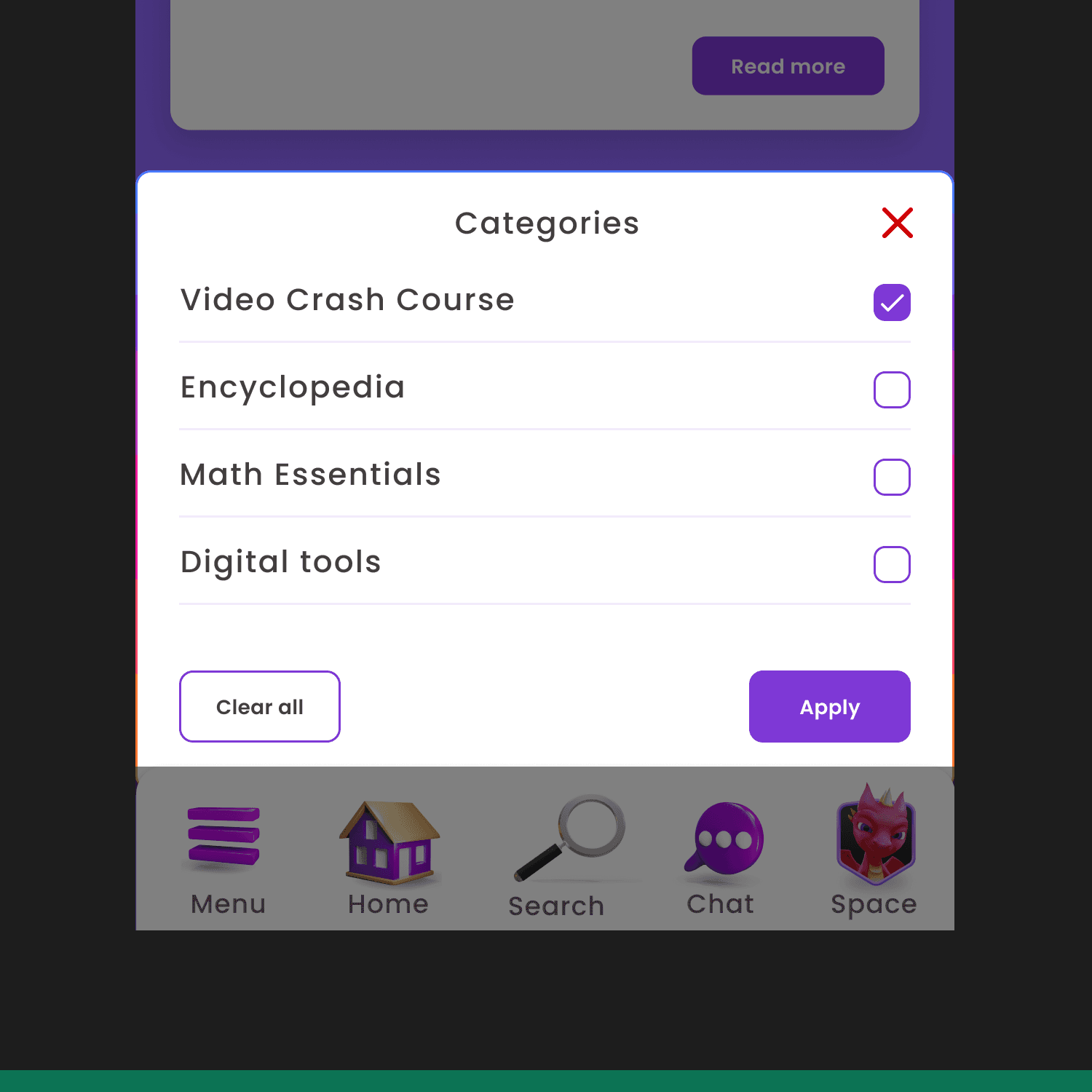
The filter interface was too small and difficult to press.
The filter interface was too small and difficult to reach with one hand.
After
After
To address this, we moved the filter interface to the bottom and expanded it to fill the screen's width.
To address this, we moved the filter interface to the bottom and expanded it to fill the screen's width.

Before
Before
The orange interface for the chosen filter was confusing to some testers. Users wanted a clearer indication of which type of filter was being applied.
The orange interface for the chosen filter was confusing to some testers. Users wanted a clearer indication of which type of filter was being applied.

After
After
To address this, we changed the orange filter for 'Math Subjects' to pink, making it easier for users to quickly identify which type of filter was applied.
To address this, we changed the orange filter for 'Math Subjects' to pink, making it easier for users to quickly identify which type of filter is applied
Takeaways
Learning from the past to shape the future
Learning from the past to shape the future
Working independetly with flexibility
Working independetly with flexibility
The internship at House of Math has enhanced my ability to work independently. Karolina and I tackled problems on our own, planning and executing tasks independently.
Importance of Flexibility and Adaptability
The shift from individual interviews to a workshop format emphasized the need for flexibility in UX research. Adapting quickly to unanticipated changes highlighted the importance of agility in project management and design processes. This experience taught me to embrace change and adjust strategies to maintain progress and success.
Impact of Visual Clarity and Feedback
Many pain points were related to visual clarity and feedback in the search field, emphasizing the importance of visual design and system feedback. Clear visual feedback and a clutter-free interface are crucial for user satisfaction and usability. Ensuring timely and understandable responses from the system significantly enhances the user experience.
Iteration and Prototyping as Key Components
The iterative process of sketching, prototyping, and testing was crucial for refining design solutions. Early prototypes facilitated quick feedback and adjustments, allowing us to address issues effectively. Rapid prototyping and frequent testing ensure that ideas are validated and the final product meets user needs.
OTHER PROJECTS

OTHER PROJECTS