Platform

Background
Desktop training didn't fit frontline workers, so we bet on short, mobile, AI-led practice
Attensi's training was desktop-based and built for depth, but most frontline staff don't work at a desk, and long simulations were exhausting, so people finished once and rarely came back.
The workforce is increasingly Gen Z, the users who most need low-pressure conversation practice, but the hardest sell for a long, desk-bound simulation.
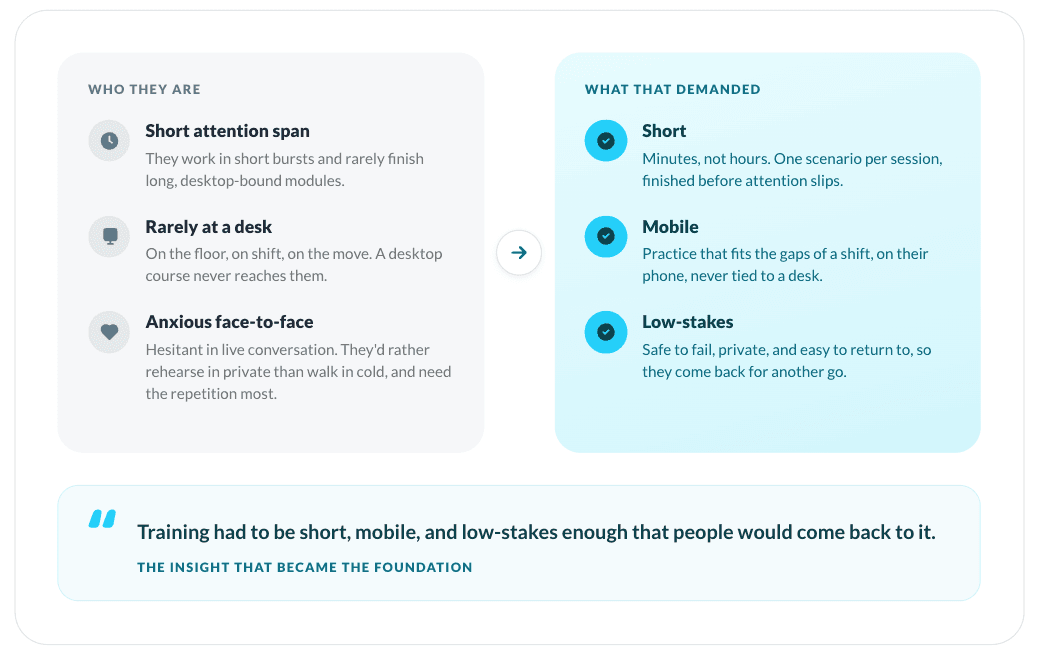
Training had to be short, mobile, and low-stakes enough that people would actually return. That became the product's foundation.
Skills RealTalk was the bet to close that gap, a new mobile-first, gamified product built around short, repeatable challenges.
Problem statements
The real challenge was solving three problems at once
Design a mobile, AI-led product for practising difficult conversations, one that had to resolve three hard problems at once:
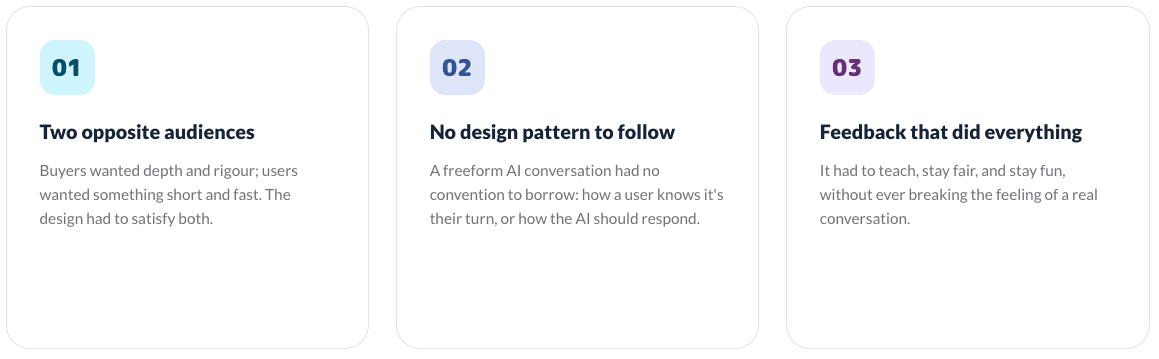
Two opposite audiences: buyers wanted depth and rigour, users wanted something short and fast.
No design pattern to follow: a freeform AI conversation had no conventions to borrow.
Feedback that had to teach, stay fair, and stay fun, without breaking the feeling of a real conversation.
Meet Skills RealTalk

Background
Existing training didn't fit frontline workers, so we bet on short, mobile, AI-led practice
Attensi's desktop simulations were structured and in-depth, strong for complex scenarios. But that same format created two problems in the real world.

The insight: The user we really designed for
The sharper problem wasn't the format. It was who these users increasingly are. Much of the frontline workforce is now Gen Z: the hardest audience to sell on a long, desk-bound simulation, yet the ones who most need low-pressure practice for a skill to stick. That tension was the insight I pitched, and it became the product's foundation.
What the research showed
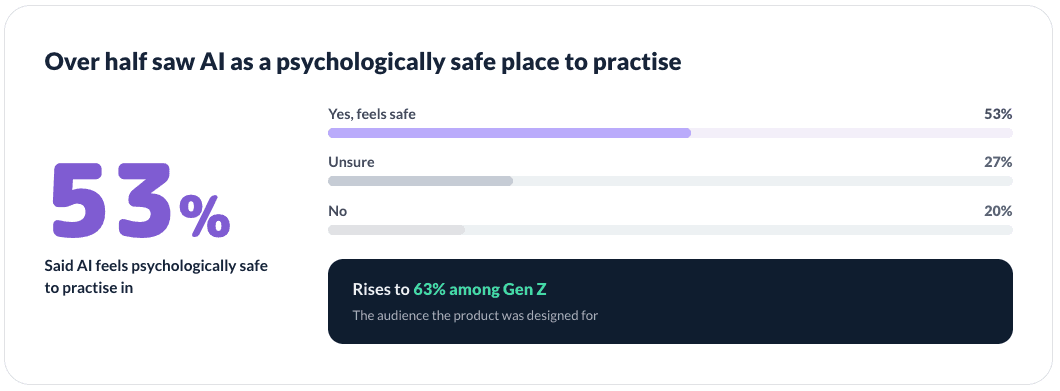
That instinct was backed by research. A 2024 Attensi survey of 2,000+ UK and US employees confirmed widespread anxiety around difficult conversations and strong demand for training, sharpest among Gen Z.
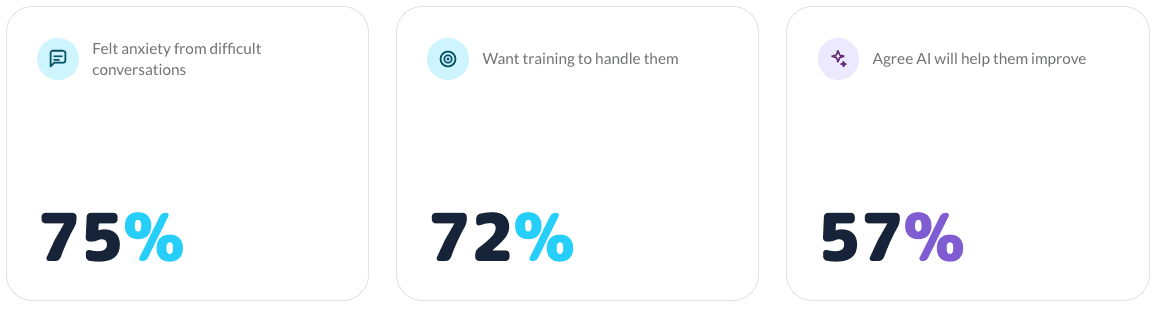

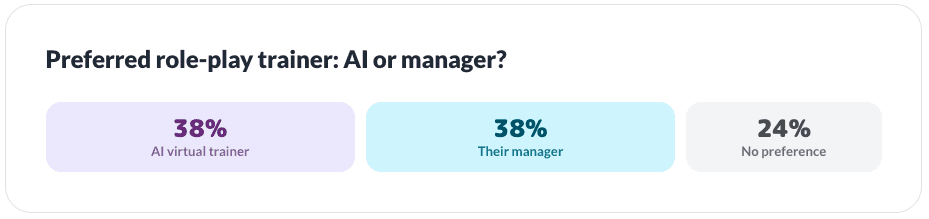
It also reshaped how I thought about the solution: people were genuinely open to practising with AI, splitting evenly between an AI trainer and a human manager, with 57% saying it would help them improve at their job. The discomfort of practising in front of a real person was itself part of the problem, and AI could remove it.
-
-
The bet
Skills RealTalk was the bet to close that gap, a new standalone product rather than an extension of the desktop tools: mobile-first, gamified, and built around short, repeatable challenges people would want to return to.
The central tension
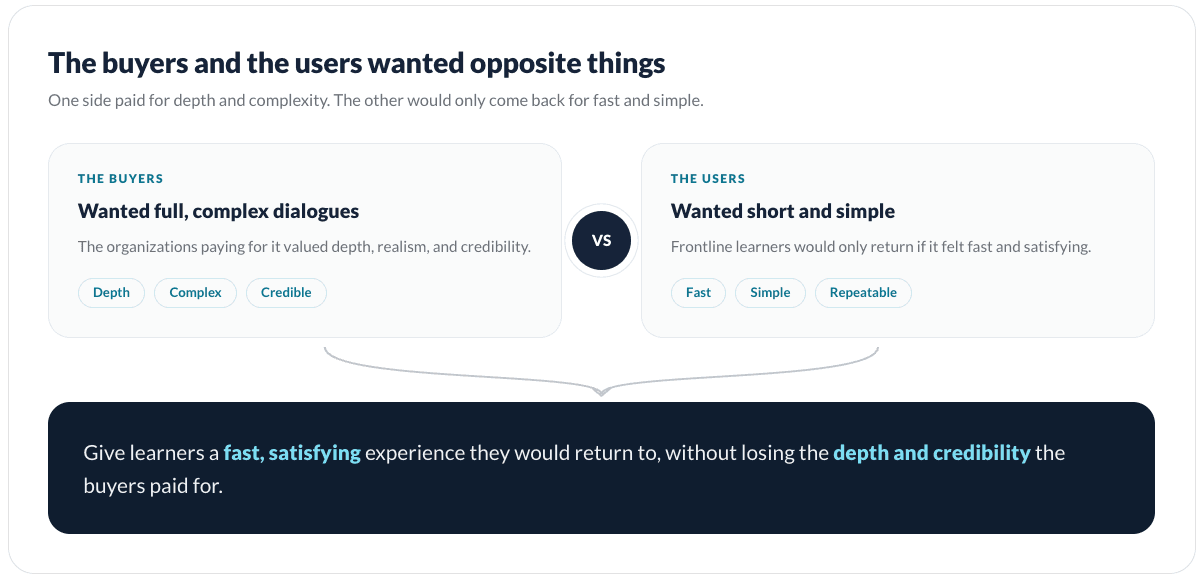
One tension shaped much of the work: the people paying for the product and the people using it wanted opposite things. Resolving that, without quietly picking a side, was most of the design.
The risk
The bet still carried real risk. Even with demand and openness to AI established, two things were unproven: whether a short, gamified format could build real confidence rather than just feel like a game, and whether "fun" could succeed at the one thing the desktop tools failed at, getting people to come back.
Problem Statement
Three challenges defined the project. Two shaped the product's direction; the third became the heart of the design work.
-
-
Designing for two opposite audiences
This tension wasn't just a positioning problem, it was the core design challenge. Buyers wanted full, rigorous training; users wanted something short and fast. Designing for either alone was easy; designing for both at once was the real problem. Lean too far toward depth and users wouldn't return; too far toward simplicity and the training wouldn't be credible enough to sell.
A conversation with no design pattern to follow
Underneath that sat a harder problem: a freeform AI conversation had no design pattern to borrow from. Unlike a form or a checkout flow, there was no convention for how a user knows it's their turn, how the interface should handle unpredictable AI responses, or how to support both speaking and typing. I wasn't adapting a known pattern. I was designing one.

Feedback that had to teach, stay fair, and stay fun
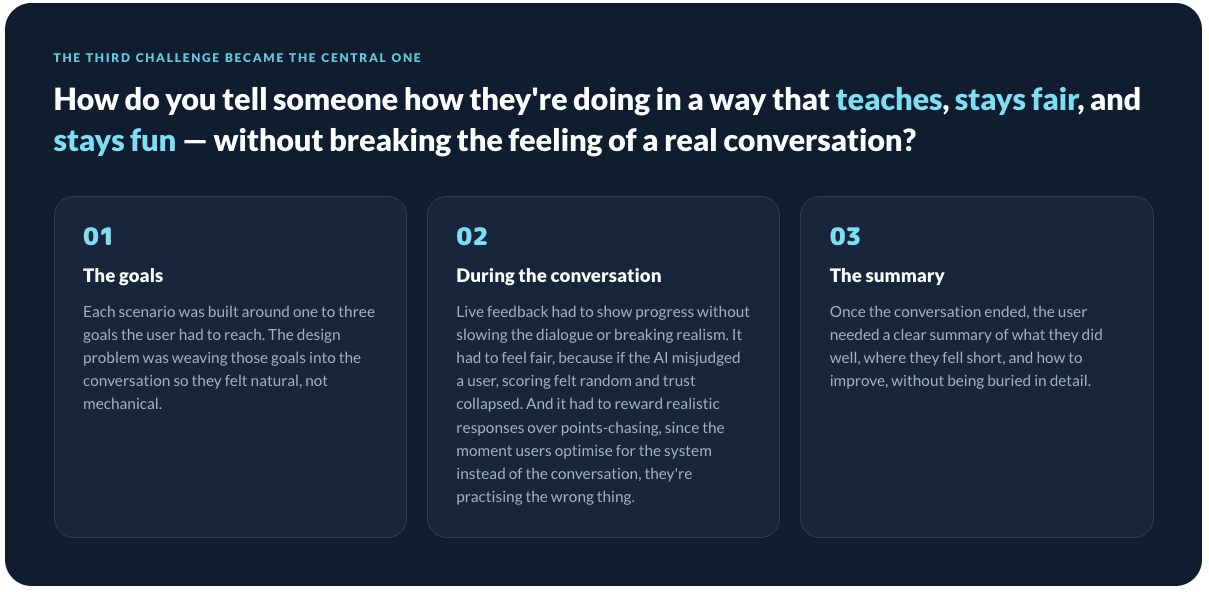
The third challenge became the central one: the feedback. One question ran through the whole conversation: how do you tell someone how they're doing in a way that teaches, stays fair, and stays fun, without breaking the feeling of a real conversation? It showed up at three moments:
Design Principles
Four design pillars, all resting on one foundation: it had to be fun
From the first pitch, the product rested on a set of pillars on a single foundation: it had to be fun. Everything in Skills RealTalk, the tone, the pace, the feedback, was built to feel playful and rewarding enough to keep people coming back.
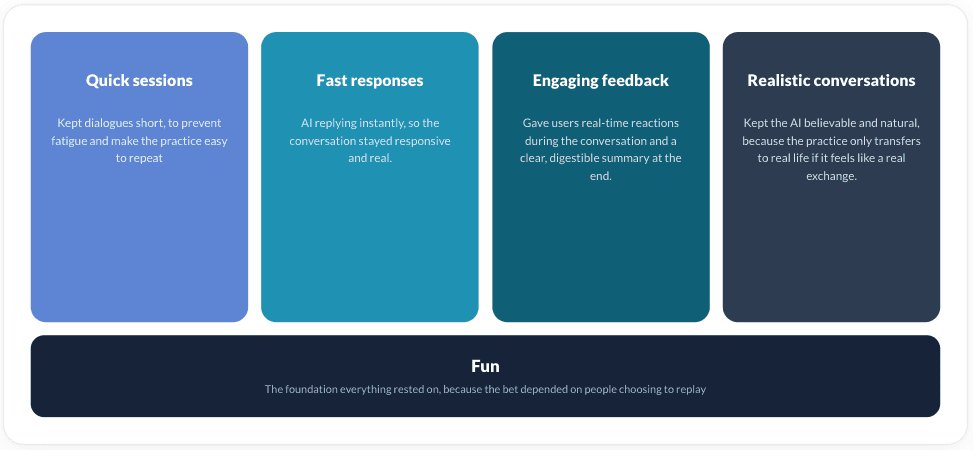
Underneath all four sat the same idea: if it wasn't fun, none of it would work, because the whole bet depended on people choosing to come back and practise again.
Role & Scope
Owning the design end to end, and building its foundation from scratch
I led the design and UX direction, working with the product manager and product owner on scope and priorities, and with the developers on what was feasible, deferring to them on technical limits and to the product side on business priorities. Knowing where to push and where to defer was part of the role.

Building the design foundation from scratch
Because the product had no design foundation to inherit, I built one: its first component library and design system, the file structure and workflow, and how designs were reviewed, handed off, prototyped, and tested. Reusing those components kept the product consistent, made building new screens faster, and gave developers a clear shared reference that smoothed handoff. That structure was a big part of what made working as the only designer manageable.
Discovery & Research
Grounding the product in evidence, and choosing to design for the user first
The direction was grounded in evidence, not assumption. Attensi's years of data from existing products showed how frontline staff learn and where conversation training breaks down, and a 2024 Attensi survey of 2,000+ UK and US employees, which I drew on, reinforced it: widespread anxiety around difficult conversations, strong demand for training, and real openness to practising with AI. The research didn't overturn the direction so much as sharpen it, confirming the problem was real and an AI-led, safe-to-fail approach was one users would accept.
Training the skills people value most
One finding shaped how I thought about the product's value: asked which human skills would stay most important as AI grows, people ranked empathy, social skills, and emotional intelligence highest. The product wasn't training peripheral skills, it was training the ones employees themselves believed would matter most.

Designing for the user first
From the start, I made a deliberate choice about who to design for first. The product served two audiences with different priorities, the businesses buying it and the staff using it, but I prioritised the user: if the experience didn't work for the person actually practising, the training wouldn't get used, and nothing the buyer wanted would follow.
Mapping the constraints early
I also mapped my constraints early. The AI avatar tool had real limitations in how the character could be presented, and the whole experience had to work on a small mobile screen. Those shaped core decisions about how the AI was shown and how the conversation was framed from the start.
Solution
Designing feedback as three moments, each balancing fun, fairness, and realism
Of everything in the product, the feedback was hardest to get right, because three forces pulled against each other at once. It had to be fun, or people wouldn't come back. Fair, or they'd stop trusting it. And real, or the practice wouldn't transfer to an actual conversation. Any one alone is straightforward; holding all three at once, in real time, on a phone, was the real design problem. So I stopped treating "feedback" as a single feature and designed it as three connected moments, during the conversation, in how it was scored, and after it ended, tuning each against those same three forces

Feedback in the moment
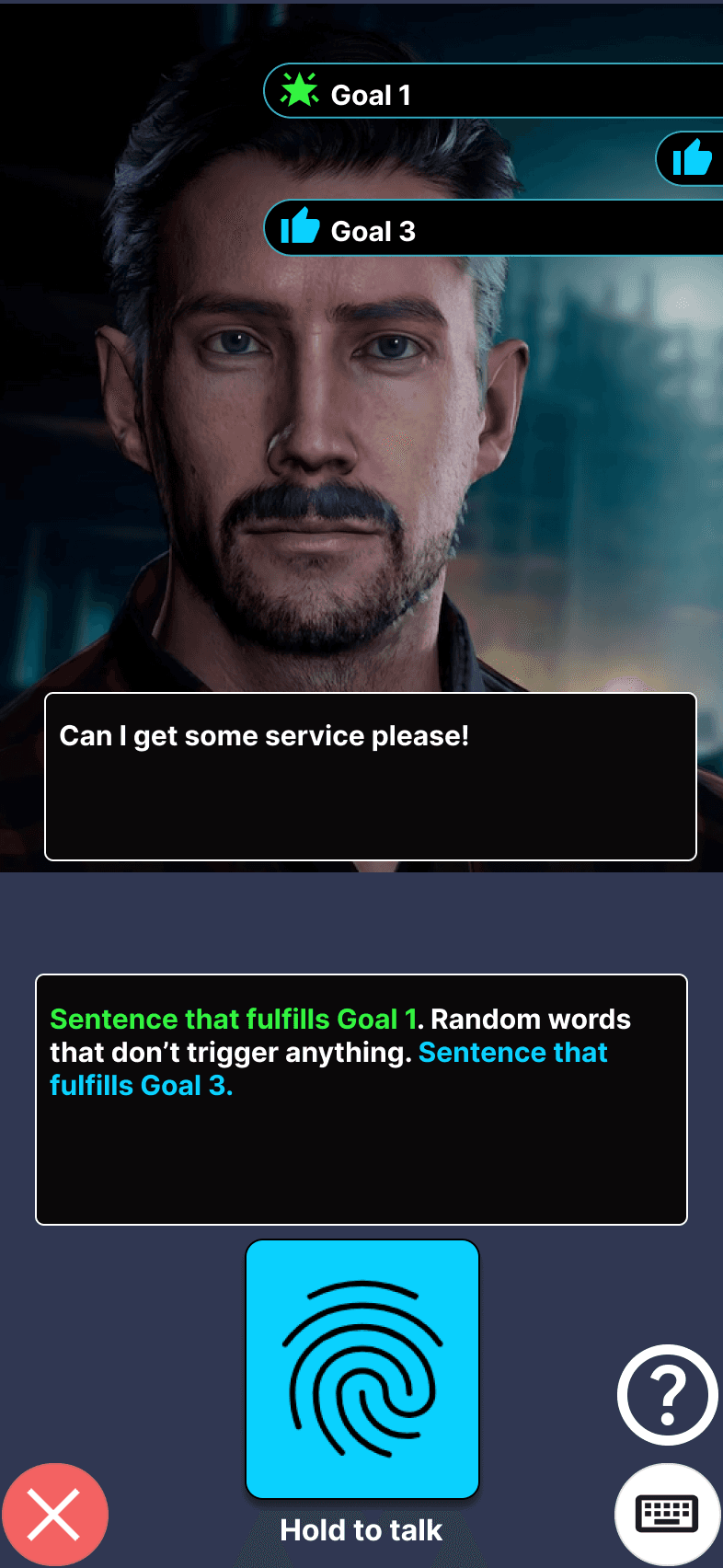
The hard part of live feedback was making progress legible without breaking the conversation. Each scenario had goals the user had to hit, so I needed to show them, in the moment, exactly what they'd said that counted, while keeping it feeling like a real conversation rather than a game with a scoreboard.
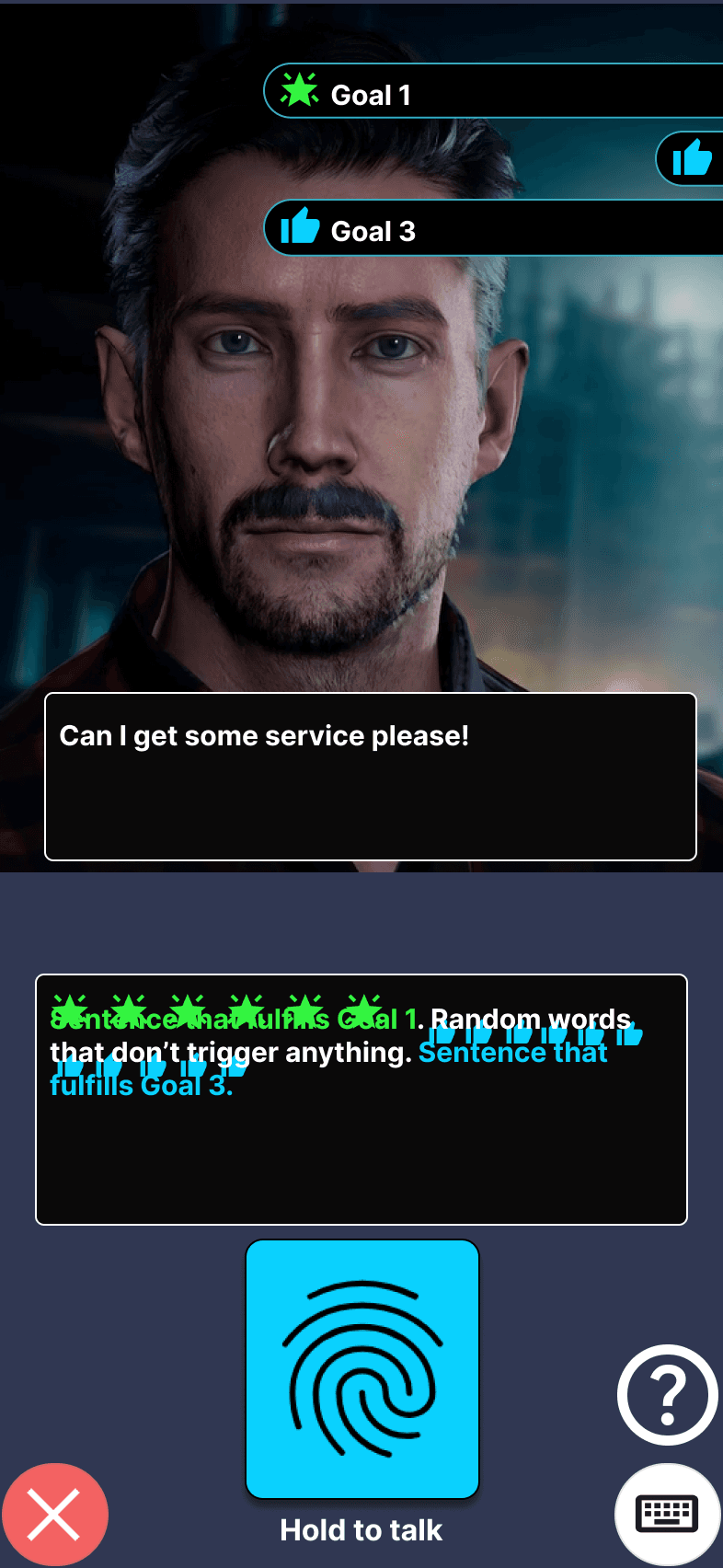
My first instinct was to highlight the user's whole response. But it was too noisy: lighting up everything pulled focus and made the feedback harder to read, you couldn't tell what actually mattered. So I narrowed it down: when the user speaks, their response appears in a chat box with only the parts that scored toward a goal highlighted in green. They see at a glance which of their own words landed, in the context of what they said.
1.
Highlight the parts that score based on all goals
2.
Playful star and thumps animation that lifts off from the highlighted words

3.
The stars and thumps fly to the goal
To make that moment rewarding, the scoring words lift off as stars and fill the goal meter. This sat right on the line between fun and distraction, and it's where I had to check my own instinct: the elaborate effects were the ones I liked best, but internal testing was clear they pulled people out of the conversation, while the restrained version kept them in it. So I cut the effects I was most attached to, keeping just enough to motivate. That kept the fun pillar on a leash: enough to reward, never so much that it broke the realism the product depended on.
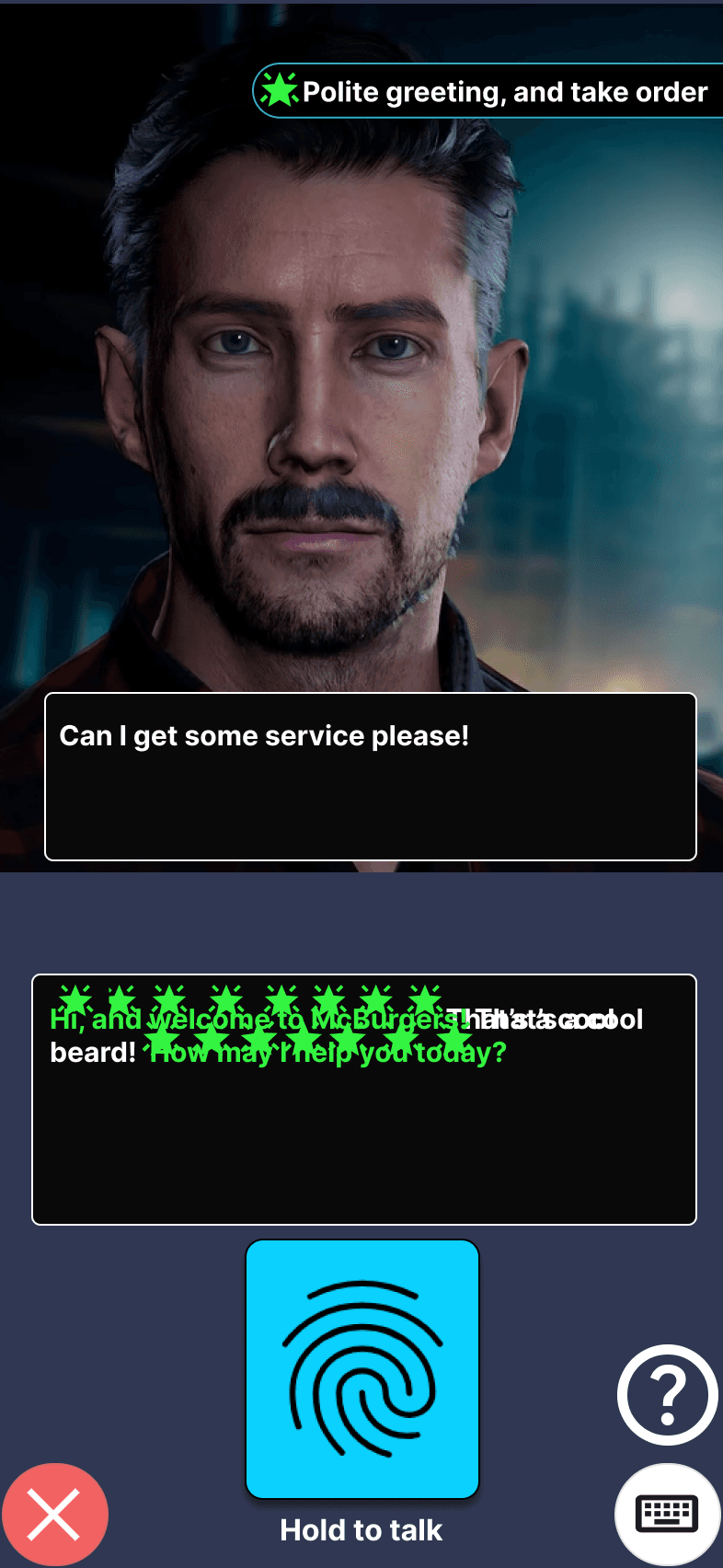
The same instinct reshaped how goals were scored. At first a user could make progress on several goals in one response, with multiple meters and animations firing together, and it was too much to follow. Digging into why, I realised the real fix wasn't calming the effects, it was the structure. A user could clear a whole interaction in one rushed line, "hi, what would you like and what size," which scored everything at once and looked nothing like a real exchange. So I gated the goals in order: greet the customer first, then take the order, then confirm the size, each step opening only once the last was done. That kept the practice closer to how the conversation actually unfolds, and kept the user on the current step instead of scanning a checklist.

1.
Highlight the parts that score for one goal at a time
2.
Playful star animation that lifts off from the highlighted words

3.
The stars fly to the goal
Making the scoring fair
This part was about fairness, and it was non-negotiable. A learning tool people don't trust is worthless. It was also the riskiest: the whole system rested on the AI correctly recognising when a user met a goal, and if it got that wrong, feedback felt random and trust collapsed. The underlying AI tool wasn't accurate enough at first, and teaching it to reliably judge a freeform answer was deeply technical. This was the one part I couldn't own alone. The judging sat with a developer, so I led it the way design can lead engineering: I defined how scoring should behave from the user's perspective, set the bar for what "correct" had to feel like, and we tuned against that standard together until it held.
The clearest example was the star rating. Five stars was meant to feel rare and earned, but early on even a flawless run was capped at four, and I caught it before our testing did: something felt off watching people finish a scenario exactly as the goals asked. Internal testing then confirmed it: colleagues completed scenarios correctly, came back puzzled they'd earned four or fewer, and saw the AI inventing reasons that didn't hold up. I flagged why that was more dangerous than it looked: if doing everything right doesn't earn full marks and the explanation makes no sense, the score feels arbitrary, and an arbitrary score quietly destroys the trust the whole tool depends on. It took more rounds of tuning than anything else in the product, until a genuinely correct performance reliably earned the full five.
A separate problem showed up even when the scoring was right: if a user did well and there was genuinely nothing to improve, the AI would invent a flaw rather than leave the critique empty. That's worse than useless: it undermines trust and teaches the wrong lesson. I addressed it through prompting, so a user who earned full marks was simply told they'd done well, rather than handed a fabricated flaw.
Fairness wasn't only about the numbers, it was about how the AI behaved. I tuned the character toward believable realism: if a user was rude or dismissive, it reacted as a real person would, and the conversation could end in a game-over screen. That kept the practice honest and the consequences real, while staying a safe place to make mistakes.
The summary: clear over clever
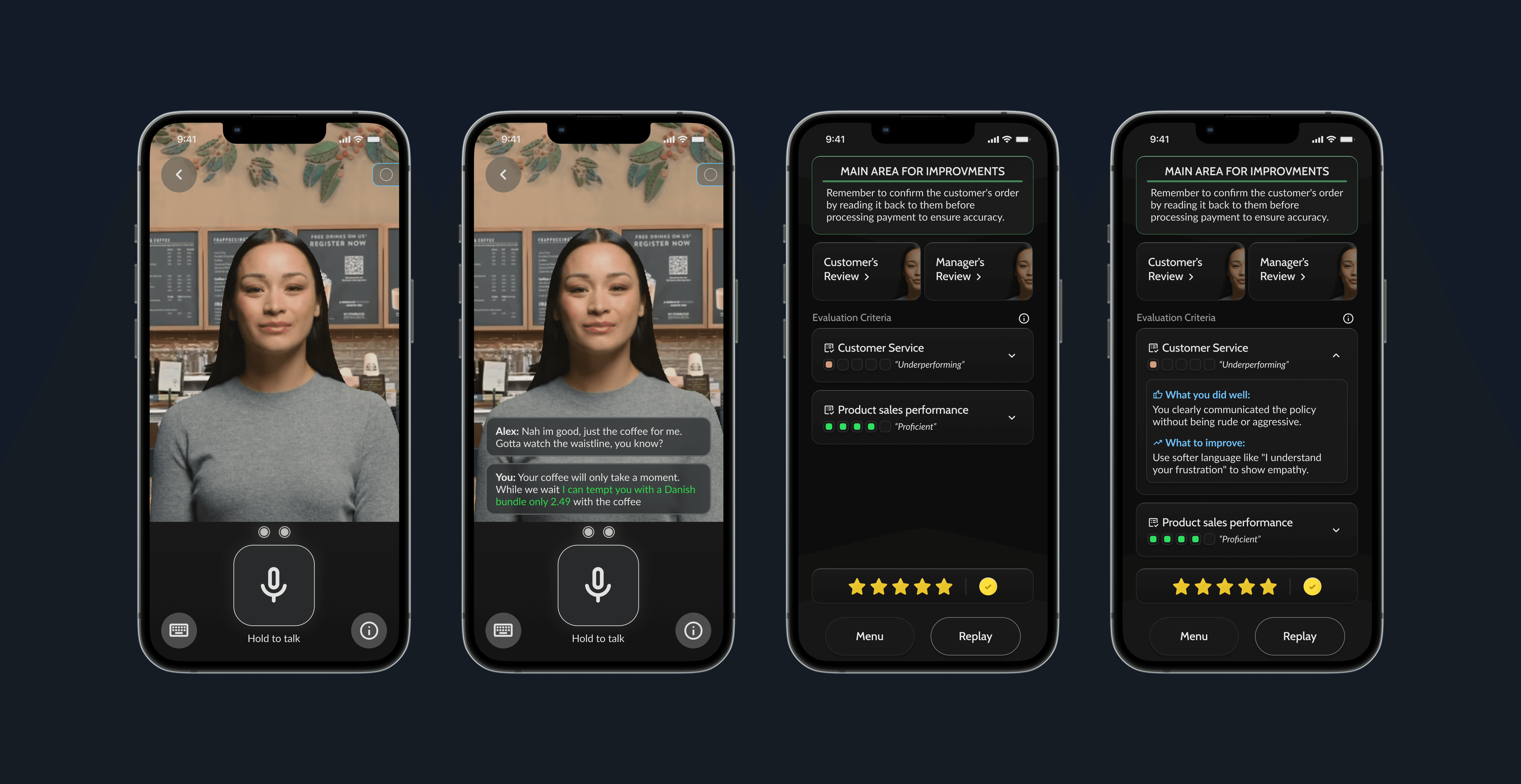
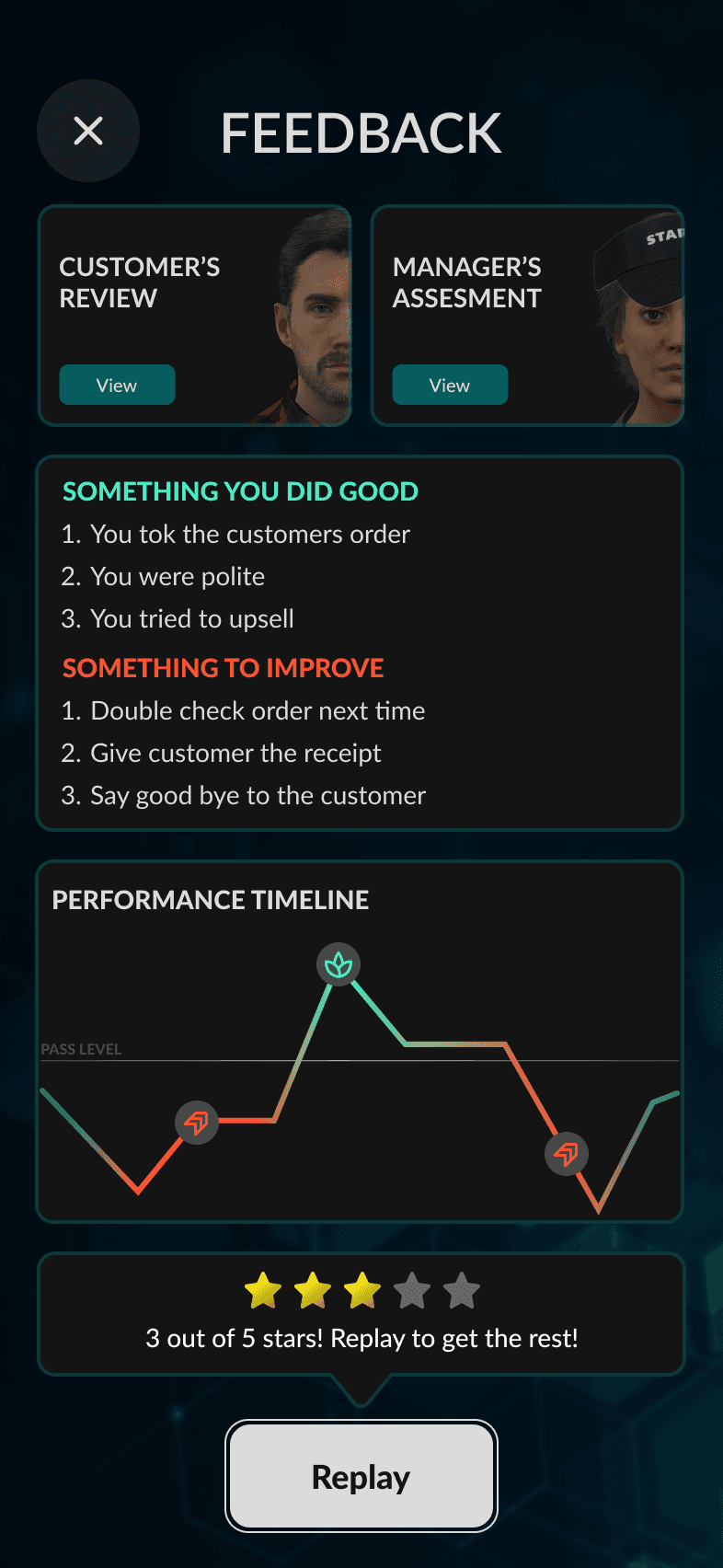
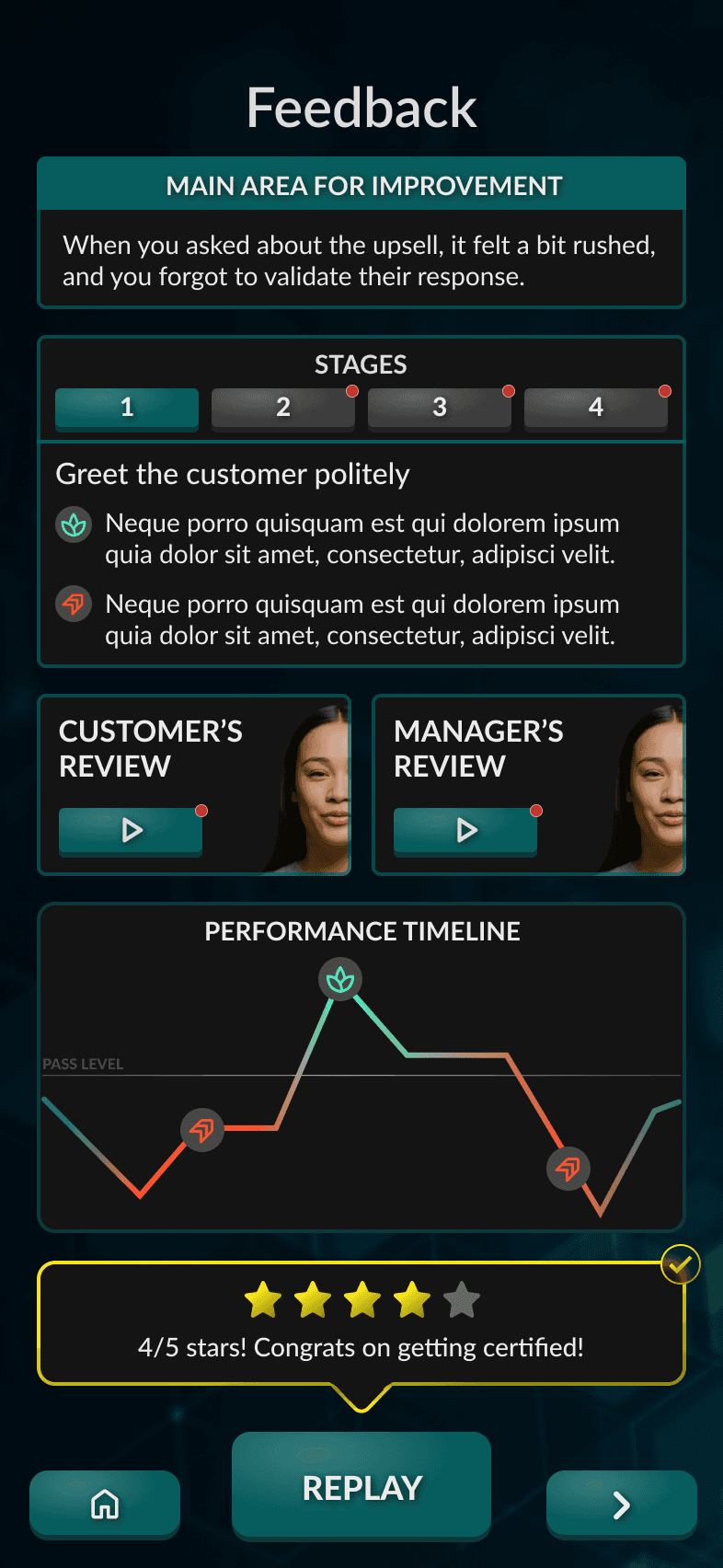
The last moment was the summary, shown once the conversation ends. My first instinct was to make it rich: graphs, light statistics, a data-driven breakdown. I held onto graphs for a while, but on a small screen after a quick session they added visual weight without understanding, the kind of overload that makes people skip feedback entirely. So the summary had to be read, or it taught nothing. It shows the stars earned, an overall takeaway of what to improve next time, and a per-goal breakdown of what the user did well and could do better, so they finish understanding three things at a glance: how they did, where they succeeded, and what to work on next.
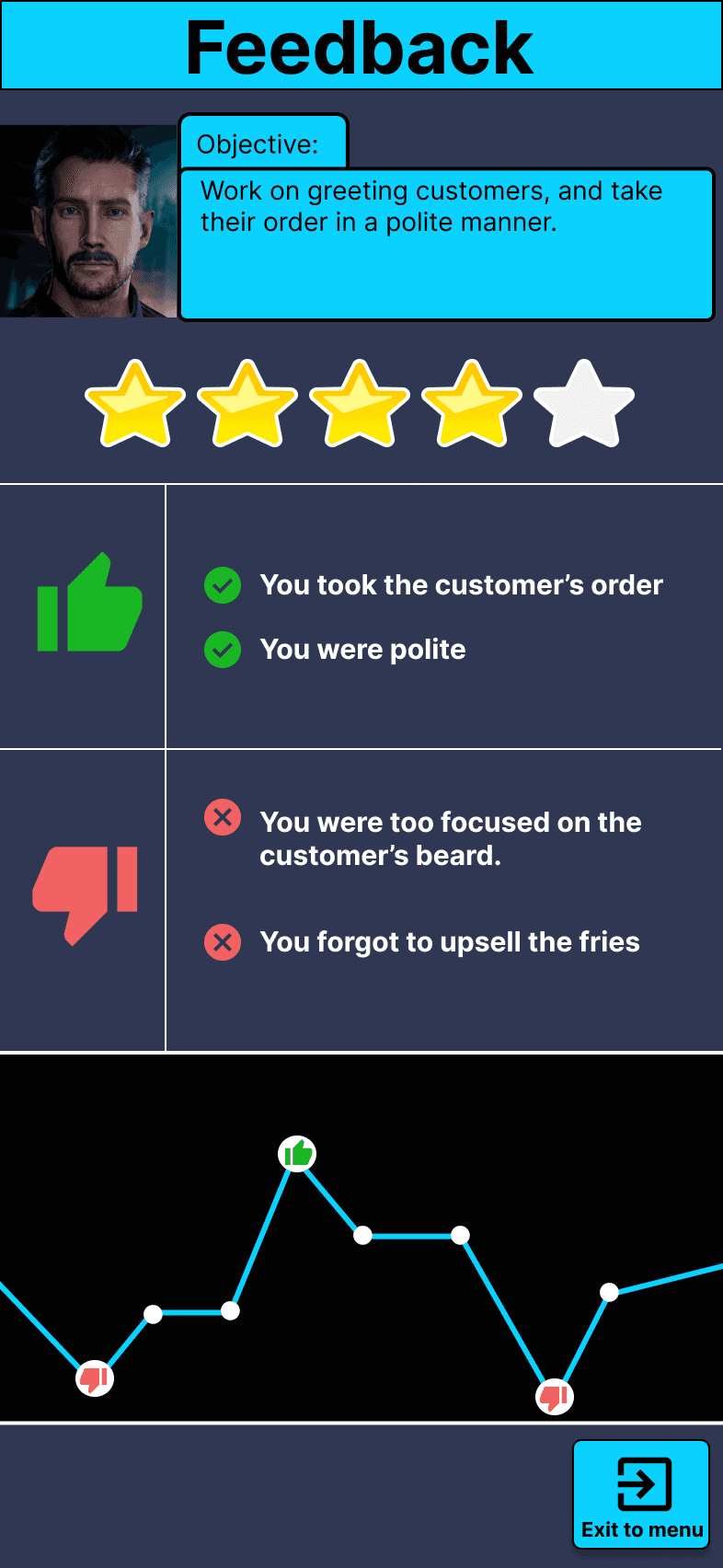
Iteration 1
The first iteration showed the objective, total stars, what the user did well and badly, and some statistics.
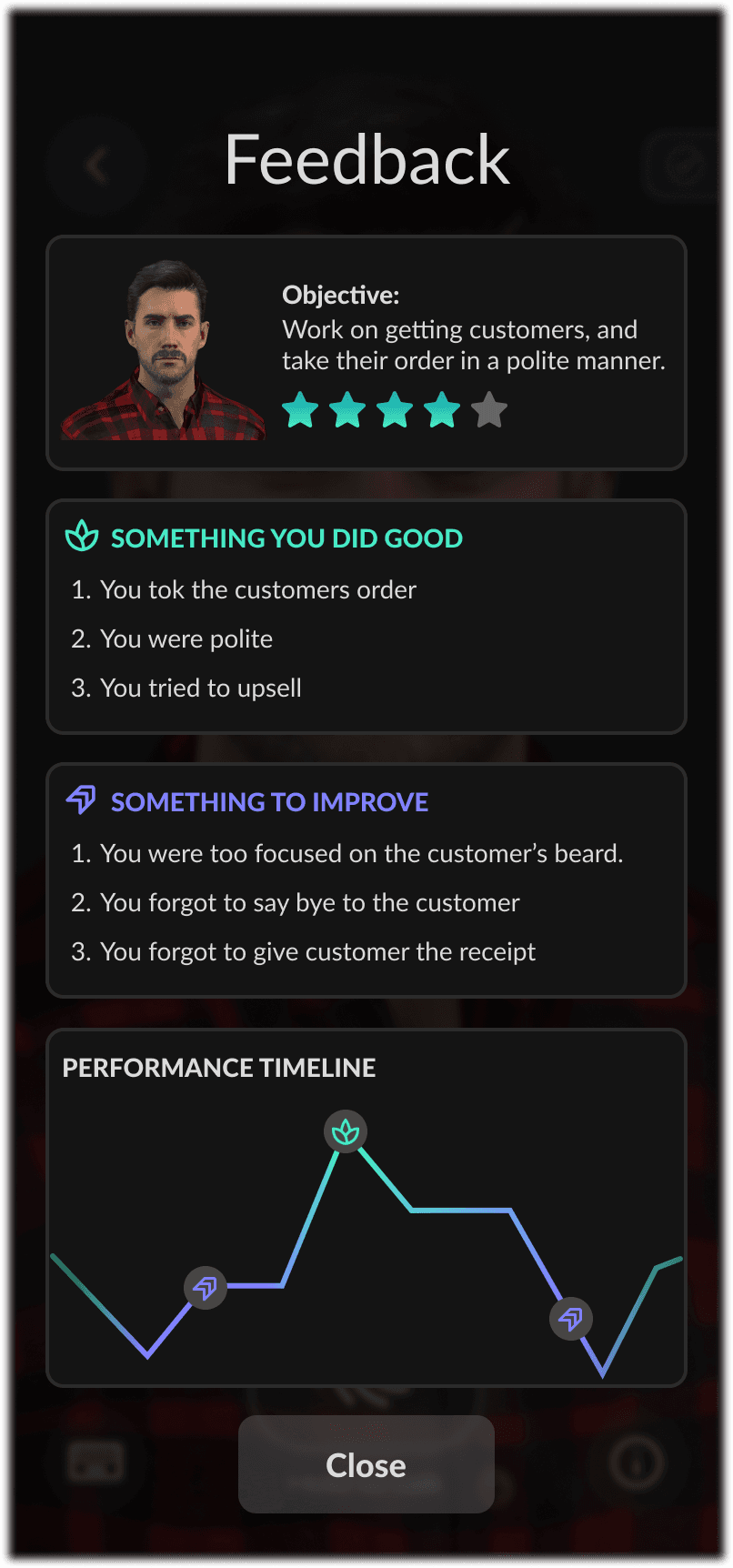
Iteration 2
This iteration reframed the feedback around what the user could improve, rather than what they did badly.
Iteration 3
This iteration added customer and manager feedback, with more direct guidance and the option to ask the AI follow-up questions.
Iteration 4
This iteration broke the feedback into stages, giving the user more detail on every interaction.
Iteration 5
In this iteration we established the final UI, a more modern, sleeker look.
Iteration 6
Replaced the stages with evaluation criteria and a traffic-light system, making feedback easier to digest.
Giving up the graphs was a deliberate trade-off, arrived at gradually. It made the product look less sophisticated on the surface, but it made the feedback genuinely usable, which mattered far more for a tool whose whole value depends on people reading it and coming back.
Across all three moments, one lesson held: designing with AI meant the design problem didn't stop at the screen, it extended into how the model behaved, what it scored, how fairly it judged, when it stayed quiet. It's a lesson I now carry into any AI product. Whether the balance worked, the results bore out: 94% of users found the feedback helpful. It isn't perfect, the scoring is reliable now but still leans slightly conservative, and tightening that is the clear next step, but it succeeded at what mattered most: people trusted it, learned from it, and came back.
Solution
Designing gameplay around voice, supporting typing for the real world, and learning most people typed
Why voice was the heart of the experience
The most natural, immersive way to practise a conversation is to actually speak it, so voice was always the heart of the experience, the version I most wanted people to use. But designing only for voice would have ignored where these users actually are. A frontline worker on a break might be in a loud staffroom, on a busy shop floor, or somewhere public where talking aloud to their phone feels awkward, especially for the more self-conscious users the product was built to help. If voice were the only option, those moments would lock people out.
Supporting both, but not as equals
So I supported both speaking and typing, but the real decision was how to weight them. The easy path was to treat them as equals, two buttons, free choice. I rejected that because of a hypothesis I had going in: people lean toward typing with an AI. Speaking aloud already carries a self-consciousness that typing doesn't, and talking out loud to a virtual human, a character the user knows isn't real, adds its own small barrier on top. There's a threshold to cross before it stops feeling strange. Equal footing would have quietly let the most anxious user stay on the easy side of that threshold, defaulting to typing and avoiding the very thing they came to practise. So I made the inputs deliberately unequal: press-and-hold-to-talk large and centred as the obvious primary action, the keyboard a small button off to the side, visible and available but clearly secondary. Speaking the default, typing the deliberate exception.

Iteration 1
First ever iteration of the gameplay design

Iteration 2
This iteration focused on making the avatar more in the focus and cleaning up the UI

Iteration 3
This iteration i tried to use a glass/hollow effect on the UI and buttons to draw more attention to the avatar

Iteration 4
After switching to HeyGen, the avatar couldn't fill the screen without showing its lower resolution, so I zoomed it out and anchored the UI in a grey panel beneath it

Iteration 5
Cleaned up the UI to fit more of the dark sleek theme
The avatar constraint
The avatar model shaped the layout more than expected. HeyGen couldn't fill the screen the way it did in iterations 2 and 3 without its lower resolution showing, so I zoomed the character out and anchored the UI in a grey panel beneath it. That worked, but the panel took about a third of the screen and pulled focus from the conversation, the one thing the product depended on.
That's when I stopped treating the model as a fixed technical limit and recognised it as a design constraint. Rather than keep designing around it, I built concept designs proving a different model held attention far better, and used them to make the case for switching vendors. The team agreed, and the product is moving from HeyGen to Anam. It's an example of something I now carry into any AI product: the model you choose is a design decision, not just a technical one.

Constraint with HeyGen
We had to zoom the character out because of the low resolution, which left empty space at the bottom.
Adapting to constraint
I had to adapt to this constraint. This is the design that shipped, but I've always disliked how the dark panel pulled attention from the character.

Latest iteration: Anam version
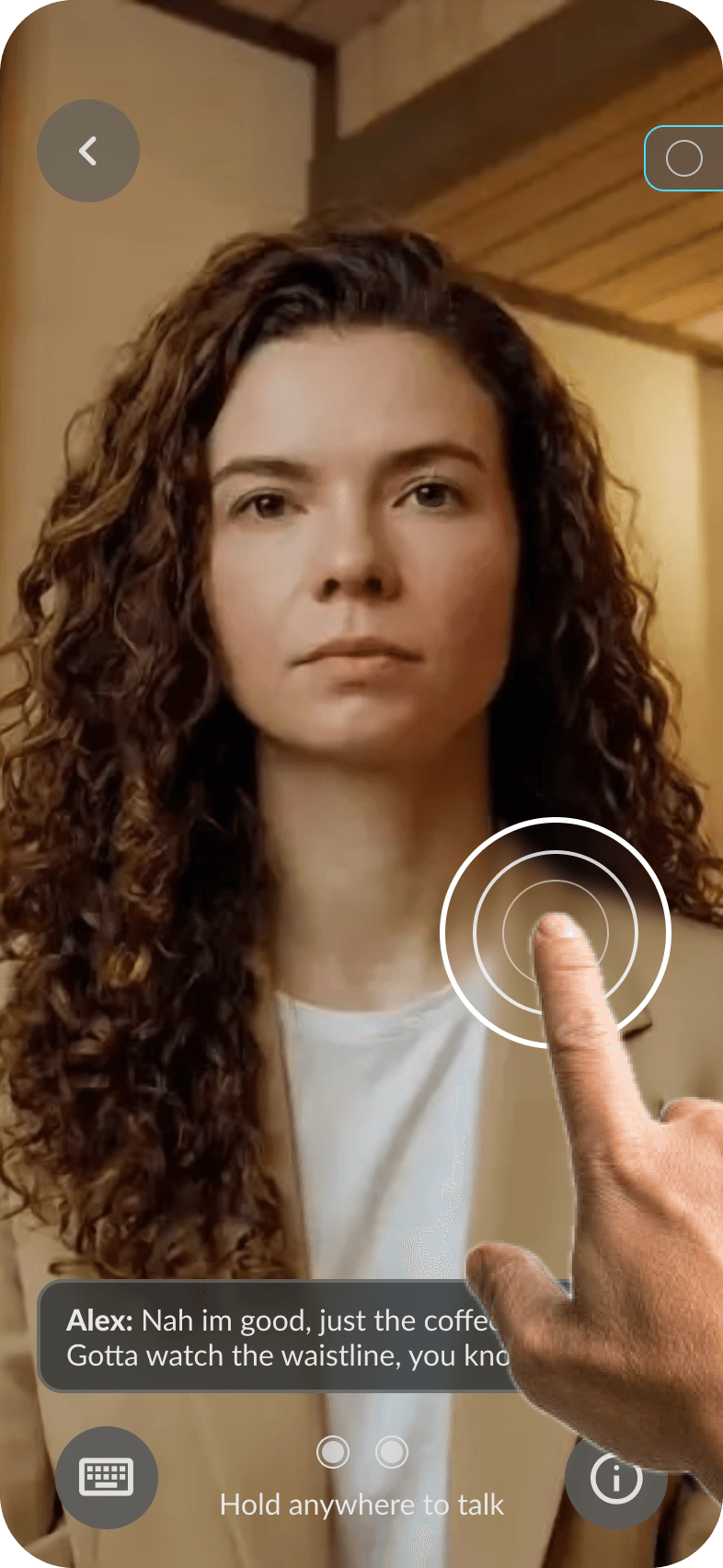
With Anam's AI model, we could finally let the character fill the whole screen, putting more focus on the conversation and reducing distracting UI.
Latest iteration: new interaction
In the latest iteration, I removed the voice button and designed an interaction where the user can hold anywhere on the screen to talk, and let go to finish.

Latest iteration: new interaction
To prevent mis-clicks, only the green area is hold-to-talk; the red areas, where the buttons sit, are excluded from that interaction.
What the data showed
The post-release data showed the tension was real. Even with voice emphasised, most users reached for the keyboard. My hypothesis had played out: people did lean toward typing. Emphasising voice expressed one of the product's core principles, realistic conversations: a real conversation is spoken, not typed, so speaking was always the truest form of the practice. But forcing it would have worked against the product's whole purpose. I'd also suspected, reading how anxious this audience was, that typing could act as a gentler entry point, a way for the most nervous users to start engaging at all, then build toward speaking as their confidence grew. That progression is something I'd want to measure over time, as users grow more familiar and safe with the product.

The resolution
That, to me, is the real resolution of the tension. Supporting both inputs was the right foundation: it met users wherever they were and never forced an anxious person into the highest-pressure action before they were ready. What the data sharpened was the next problem, not whether to offer both, but how to design the journey between them, nudging people from typing toward speaking as their confidence grows. That progression, through context-aware prompts or encouragement over time, is exactly the kind of problem I'd want to take on next.
Impact
Live with five customers, and the data showed it worked: people came back and measurably improved
Skills RealTalk shipped and is live with five enterprise customers, putting the product into the hands of real frontline teams in production. But the result I care most about isn't that it launched, it's the evidence that it actually works.
The behavioural evidence: people came back and improved
Two kinds of data tell that story. The first is behavioural data, taken from the product's analytics across real usage at the enterprise customers. It shows people doing the thing the whole product was betting on: coming back. On average, users replayed each conversation more than three times, exactly the repeated practice the desktop product never got out of people. And as they repeated, they measurably improved: on a first attempt at a scenario like "Challenging Conversation," users got around a quarter of it right; by their best attempt, that climbed to over 80%, closing roughly three-quarters of the knowledge gap. The same pattern held across conversations. Sessions stayed short, mostly five to twelve minutes, confirming the bite-sized format worked.

What users told us
The behavioural data matters because it backs up what users told us about themselves.

Why the gains trace to the design
The feedback system I'd invested the most in was borne out too: 94% found the feedback helpful, direct validation of the work to make it fair, clear, and motivating. And the engagement was no accident, nor forced. Nothing required users to replay a conversation; the goals, the scoring, and the gamified feedback were built to make them want to. People came back voluntarily because the experience was designed to pull them back, and since the measurable improvement came through that repeated practice, the gains trace directly to those design decisions.
Being precise about the evidence
It's worth being precise about the evidence. The performance data comes from real usage and reflects genuine behaviour; the survey is self-reported, from a modest sample of around 35-40. Neither alone would be conclusive, but together they point the same way, and the consistency between what users did and what they said gave the team strong confidence the product was doing its job. The respondent base also skewed young, the largest group aged 18-25, consistent with the Gen Z audience the product was designed for.